
This Release Candidate 2 contains some significant changes that we would like to run by you for feedback before the final 2.0 release.
Components are production-ready
Components officially left the “experimental” stage, so you can start using them on your live sites. 💪
Instant Class edit
While we have already improved the builder and frontend performance in 2.0, the class editing experience on sites with thousands of classes was still not instantaneous, especially for fast typists.
Editing a class should now feel instantaneous, regardless of whether your site has 10 or 10,000 classes. ⚡
As classes are a core part of Bricks, we have to ensure that this change does not introduce any unwanted side effects. Please notify us in the forum or via email if your class edits are not applied or saved correctly.
Command Palette: Elements scope
The new Command Palette, introduced in the last 2.0-rc release, offers you yet another massive productivity boost through the new “Elements” scope, which allows you to quickly insert individual elements or entire element structures using an Emmet-like syntax.
All, of course, fully keyboard-accessible. ⌨️
@section * 2 > @heading + @text + @button
This creates the following structure (two times because of the multiplier: * 2):
Section
└Container
├Heading
├Text
└Button

You can even save element structures for instant insertion the next time you need it.
Documentation: https://academy.bricksbuilder.io/article/command-palette/#elements
Bricks now also remembers the last selected scope throughout builder instances in your browser (via localStorage). So if you primarily use the Palette in one scope, i.e., to navigate between pages, you no longer have to switch scopes constantly every time you open the Command Palette.
Preload custom fonts (to avoid FOUT, CLS)
Another new performance improvement is the ability to preload all your custom fonts, which you can enable under Bricks > Settings > Performance > Preload custom fonts. This will help further avoid FOUT (Flash of Unstyled Text) and CLS (Content Layout Shift). 🔥
Control group visibility
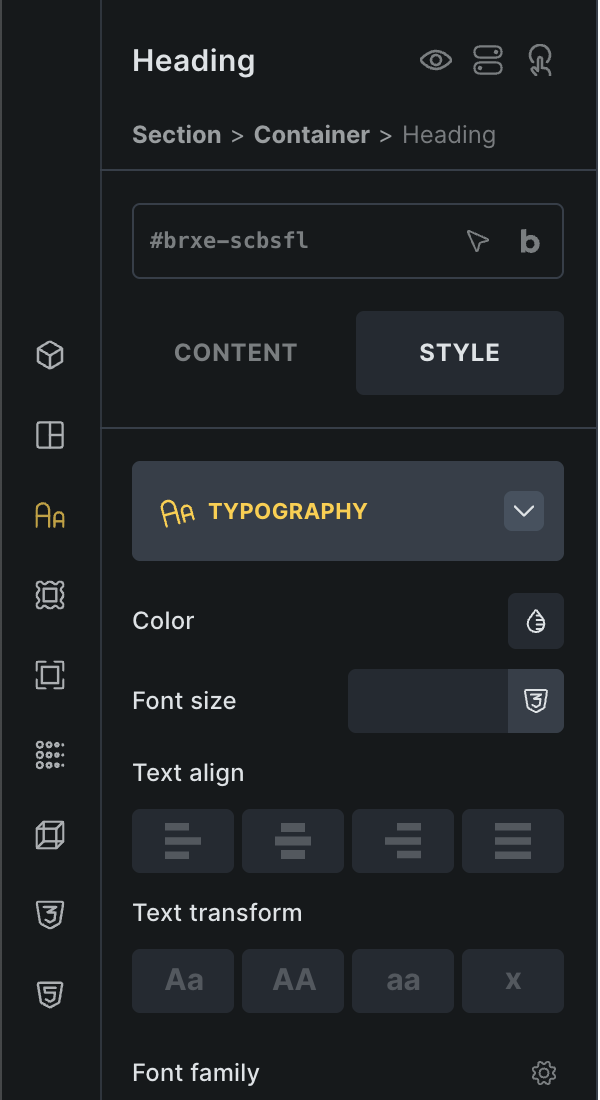
When editing an element, Bricks now displays only the open control group in the “Style” tab.
This means less scrolling and more usable screen estate. Especially useful for those working on smaller screens.
Clicking the control group title collapses the group and lets you view all groups.
If you prefer the old way of always showing all style control groups, you can switch back to using that one under Bricks > Settings > Builder: Control group visibility.
Control & structure panel width for every browser
When working in a team on a Bricks site, everyone had to use the same panel widths, as there was only one site-wide width set. Now, Bricks stores your control & structure panel width in localStorage, so you can even have differently sized panels in different browsers. 😎
History / Revisions: Now accessible from Settings/Manage panel
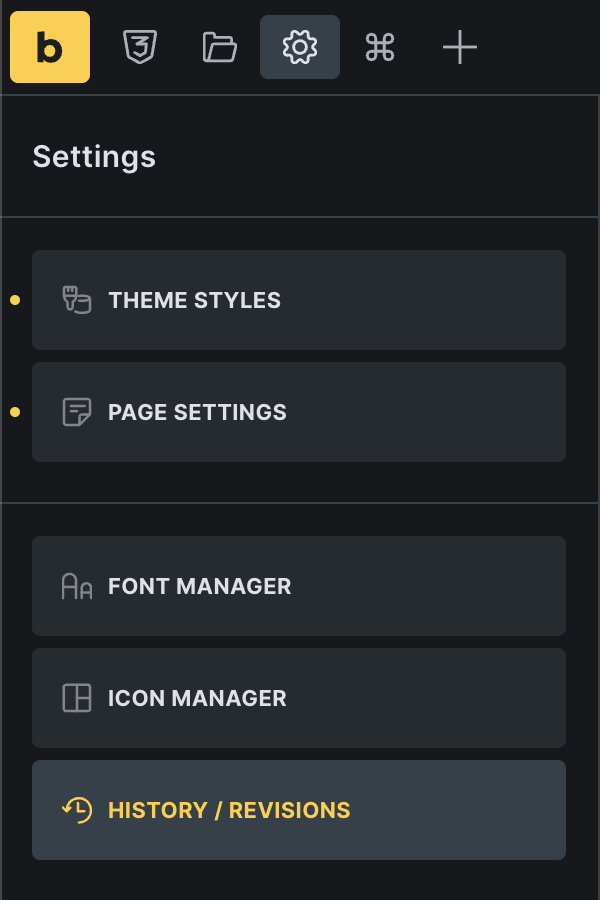
In a decision to further streamline the UI & toolbar, you can now access the “History / Revisions” panel under the Settings/Manage (gear) icon in the builder toolbar.
All new translations & 9 new languages
All translations have been completely overhauled for 2.0 and are now part of this release. 🌐
This also includes new languages for the following nine languages:
Finnish, Indonesian, Korean, Thai, Tagalog, Vietnamese, Estonian, Latvian, Lithuanian.
Please let us know via email if your desired language needs further improvements.
Full changelog
- Command Palette: Elements scope (to insert elements)New
- Builder: Save control & structure width in localStorageNew
- Components: Leaving “experimental” stageNew
- Bricks > Settings > Performance: Preload custom fonts (to avoid FOUT, CLS)New
- Update all translations & 9 new languagesNew
- Bricks > Settings > Builder: Control group visibilityNew
- Video: Support YouTube Shorts linkNew
- Image element: Animation type setting for Link controlNew
- Click interaction: Checkbox to “Disable preventDefault”New
- Property Default: Query loop control improved spacingImprove
- Selector UI: Highlight selected locked classImprove
- Color Palette: Improve styling for narrow panelImprove
- Info Box Popup Template: Hide header & footer while editing templateImprove
- Elements Panel: Sticky searchImprove
- Icon Manager: Icon item jumping borderImprove
- Image: “Icon transition” show variable picker instead of dynamic dataImprove
- Modified settings: Search width (narrow than other controls)Improve
- Orphaned elements: Improve detection on builder loadImprove
- Quick Access Bar: Hide when editing component propertiesImprove
- Quick Access Bar: Vertical alignment on small screens & overflowing separatorImprove
- Query loop UI: DD picker in repeater needs different colorImprove
- Remove all .eot font file references (WooCommerce, Icon fonts)Improve
- Class edit lag (on large global class set)Improve
- Classes: Misleading delete messageImprove
- Code: Skip loading prettify assets if code is executedImprove
- Icon: Missing SVG style controls with dynamic dataImprove
- Variable/class Manager: Save button cursorImprove
- Variable Picker dropdown: No results if value includes a single hyphenImprove
- Builder toolbar: “History/Revisions” now located under “Manage” (gear) iconImprove
- AJAX Pagination: Target Main Query and pagination missingFix
- Accordion Nestable: Icon rotate also targets accordion withinFix
- Bricks > Settings: “Show favorites only” (Font family options) not workingFix
- Builder inside builder, if URL contains “#”Fix
- Canvas: Click on block with link follows link to reload canvas using linked URLFix
- Command Palette: Duplicated results after selecting post type “All”Fix
- Command Palette: ESC hides/closes component panel controlsFix
- Dropdown in filter: Loop stops working after filteringFix
- Gutenberg: Image center aligned, not aligned in BricksFix
- Nav Menu: Mobile submenu not openingFix
- Query Loop: No option to choose “Media” post typeFix
- Quick Access Bar: Indicator not updated after reselecting elementFix
- WooCommerce: Product Gallery unresponsive in CSS gridFix
- WooCommerce: Default Lost Password Confirmation not showingFix
- Polylang Maintenance Template not applied, Language Switcher is showing template URLFix
- Quick Access Bar: Can’t use CTRL + ALT to add curly brackets (on Windows)Fix
- Basic Text & Form options: linebreaks not possibleFix
- Contextual Spacing: Default unit “px” not added to numeric valueFix
- Dropdown: Cursor is always “pointer” (even if element is not clickable)Fix
- Icon: Change custom icon resets style controlsFix
- Inherited styles indicator z-indexFix
- Interaction: Clear form fixFix
- Masonry layout: Deactivating it causes an infinite loopFix
- Mini Cart: Count visibility always showsFix
- Nested query loop: First loop always returns one result (in builder)Fix
- Posts: Masonry items overlap (infinite scroll)Fix
- Quick Access Bar: Not working in Conditions, Interactions, Hide element panelFix
- Quick Access Bar: Style indicator not shown for styles set on classFix
- Background image: Panel doesn’t reset and wrong notice after the dynamic data field has been clearedFix
- Bricks disabled Woo style causes WooCommerce Subscriptions plugin PHP noticeFix
- Bulk select: Rich text content resets if two rich text elements are wrapped togetherFix
- Bulk-select: Wrong order once pasted/movedFix
- Class Manager: Duplicated class custom CSS %root% refers to the old class nameFix
- Color palette: Lightness slider bugFix
- Connect property: z-index issue on purple icon while scrollingFix
- Heading: ::first-letter pseudo element doesn’t workFix
- Nav Nestable: Top level “gap” set on class gets overridden on mobileFix
- Pasting elements to components does not work, if we paste to child elementsFix
- TOC: Not updated if target selector content changed (AJAX, Query filters, Load More)Fix
- Text link: Remove default small min-height from default SVG stylesFix
- Component global class property generating wrong styleFix
- External CSS: Update header template ID CSS doesn’t trigger regenerate CSSFix
- Form: Webhook action dynamic tags not working for URL fieldFix
- Media Query Loop: Use “post_id” DD tag for video element not workingFix
- Memory exhausted when using Bricks template shortcode on certain plugin hooksFix
- WooCommerce Products Filter: Taxonomy filter PHP Notice if selected taxonomy deletedFix