
With over 100 changes and dozens of new features, Bricks 1.11 is one of our most new-feature-rich updates and marks another significant milestone towards Bricks 2.0.
Query filters: Phase 2
This relatively new but already significant building block of Bricks received the following upgrades:
- New element: Active filters (quickly view and remove applied filters)
- URL parameter support
- Set custom URL parameter names for your filters (e.g.
_category) - URL auto-updates in real time as filters are applied
- Support browser back/forward navigation/history
- Compatible with AJAX live search
- Set custom URL parameter names for your filters (e.g.
- Filter – Checkbox: Button mode
- Filter – Checkbox: Hierarchical “Auto Check/uncheck children” setting
- Filter – Radio: Hide “All” control
- Filter – Range: New slider controls
- Filter – Search: Clear input icon
- Filter – Submit: New setting “Hide if no active filters” (type: Reset)
- Source “Taxonomy”: Include/exclude terms, order by
- New interaction triggers: Filter empty & Filter not empty
- New “Remove all index jobs” button (use if indexing is stuck)
Please click the “Regenerate filter index” button under Bricks > Settings > General > Query filters after updating to Bricks 1.11. This is necessary to update the custom database table schema to support the URL parameter parsing, etc.
New element: Back To Top (Nestable)
Welcome the latest nestable element to Bricks: the “Back To Top” element.
Add it to your header or footer template to create a fully customizable “Back To Top” element visible on your entire website or any individual page, according to your requirements.
Dedicated visibility settings let you show this element only after scrolling down after a certain number of pixels or only show the element when scrolling up.
New element: Rating (incl. review schema)
The rating element lets you define and render any number of icons. Color-fill those icons in decimal steps and dynamic data support to create highly customizable rating widgets.
Use it to show a simple yet effective star rating widget on your recipe website and enable schema.org review markup (JSON-LD) with one click. This helps search engines understand and present your reviews in a structured way, improving the visibility of your content in search results.
It’s probably the easiest way to increase your search engine CTRs. Bricks automatically creates the required markup so that search engines enrich your text search results with star ratings and review details.
Various accessibility improvements
Accordion and tab elements, including their nested counterparts, have received significant accessibility improvements.
Accordions and Nested Accordions provide a new setting to generate schema.org FAQ markup.
The builder toolbar is now keyboard accessible. The new ALT/OPTION + T keyboard shortcut lets you quickly focus on a TAB through the toolbar.
The “Pages” panel is now keyboard-friendly, and the search can be cleared with a click, or you can create a new page from it.
Lastly, the video element with overlay and icon settings is now keyboard-accessible.
New in-builder productivity features
We redesigned the in-builder context menu for more copy-and-paste actions, such as copy-and-paste element conditions and interactions.
The dynamic data picker lets you pin and save custom tags you frequently need for faster access. Categories can be toggled to make this core Bricks feature less cluttered and more productive.
Clicking the query loop icon in the structure panel now opens the query loop control, saving you precious time editing all your queries.
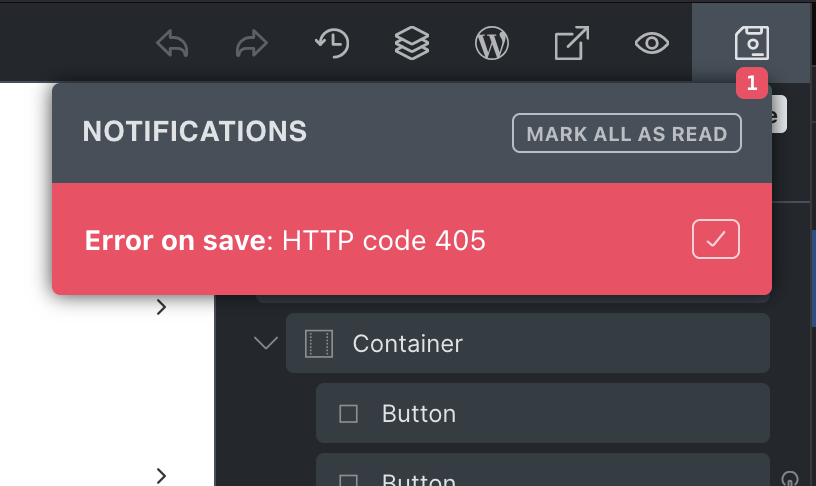
If a builder save should ever fail, Bricks 1.11 shows a notification with details about save errors (HTTP code), providing you and us with more information for easier debugging.
A more performant builder
As you build more complex and powerful sites with Bricks using thousands of classes on pages with hundreds of elements, Bricks 1.11 further improves the builder’s performance.
The upgrade to Vue.js 3.5 (https://blog.vuejs.org/posts/vue-3-5) comes with noticeable performance gains, which the Vue release post sums up nicely:
In 3.5, Vue’s reactivity system has undergone another major refactor that achieves better performance and significantly improved memory usage (-56%) with no behavior changes.
In addition, 3.5 also optimizes reactivity tracking for large, deeply reactive arrays, making such operations up to 10x faster in some cases.
On top of that, we refactored our global class and control panel logic to tackle the following in-builder lags that users experienced on sites with thousands of classes and hundreds of elements:
- Initial delay when typing a class name in the classes dropdown
- Lag or even freeze when creating a new class in the builder
- Element control re-render lag when selecting a different element or toggling control groups
There’s also a new Bricks setting called “Query max results” under the “Builder” tab that lets you limit the query loop results in the builder. Use it if complex nested queries cause any noticeable delay in the builder.
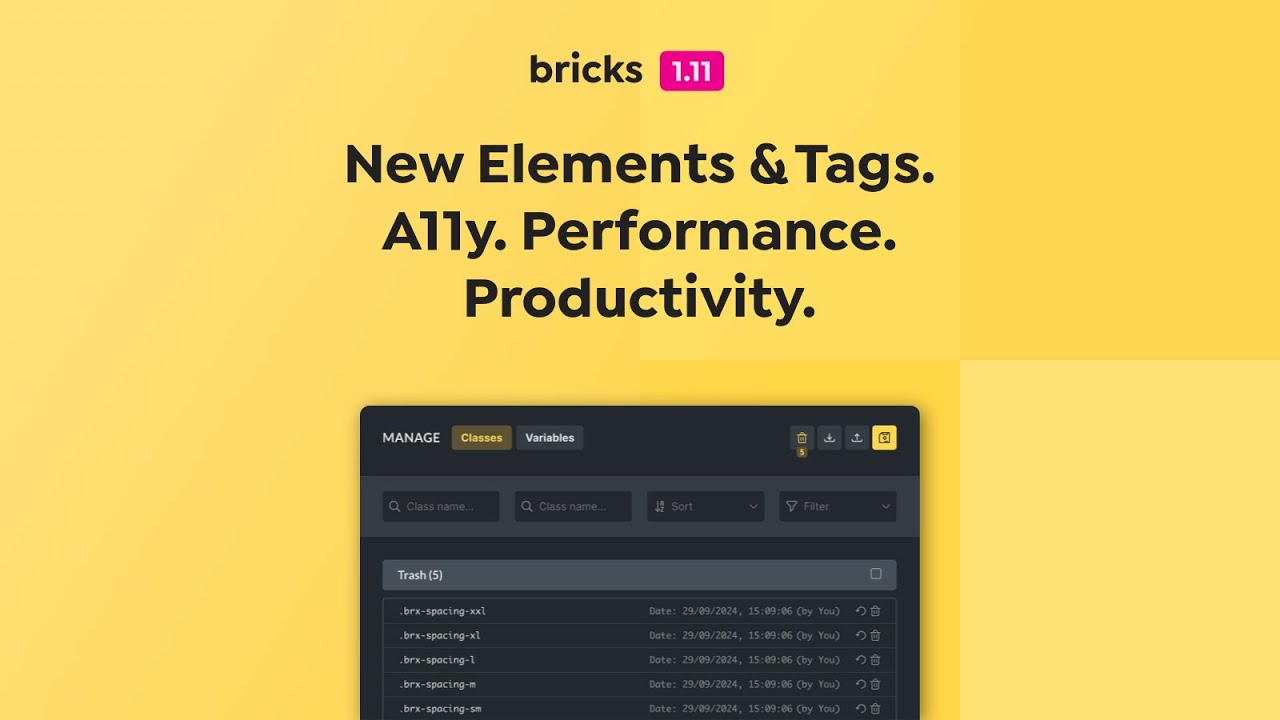
Global classes: Trash
Have you ever accidentally deleted a class or, even worse, many classes and wished to have a way of restoring them quickly without using a backup?
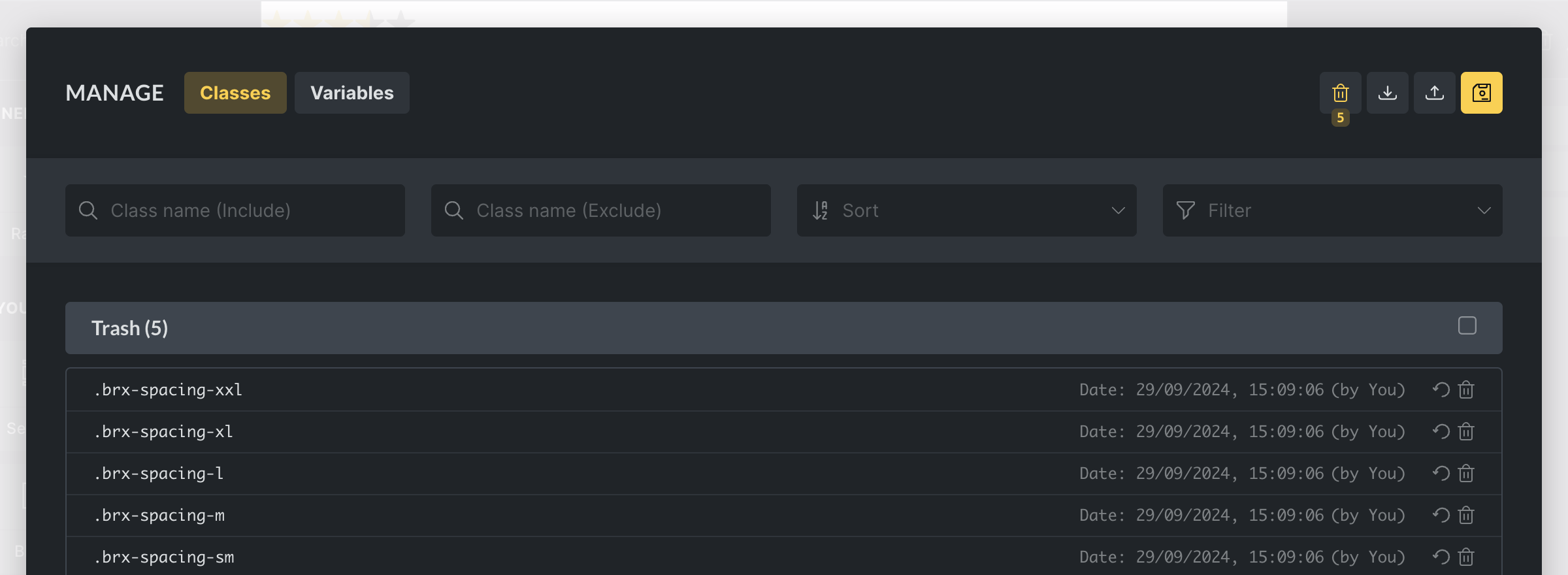
Class deletion in Bricks now works like deleting files on your computer.
Instead of permanently deleting classes immediately, Bricks moves a deleted class into the trash, which you can access by clicking the “Trash” icon in the global class manager. From which you can quickly restore or permanently delete deleted classes.
Form submission access
Before Bricks 1.11, form submissions saved in the database could only be viewed by administrators. This limited the usefulness of this feature for many of you.
You can now define which user roles can view form submissions under Bricks > Form Submissions or allow specific users to view those by editing a user profile. Deleting form submissions is still limited to administrators.
WooCommerce: New dynamic data tags
Bricks 1.11 introduces two new dynamic data tags that allow you to render your product images outside the “Product gallery” element. Such as the “Image Gallery” or “Carousel” element.
woo_product_images: Returns the product featured image & gallery imageswoo_product_gallery_images: Returns the product gallery images only
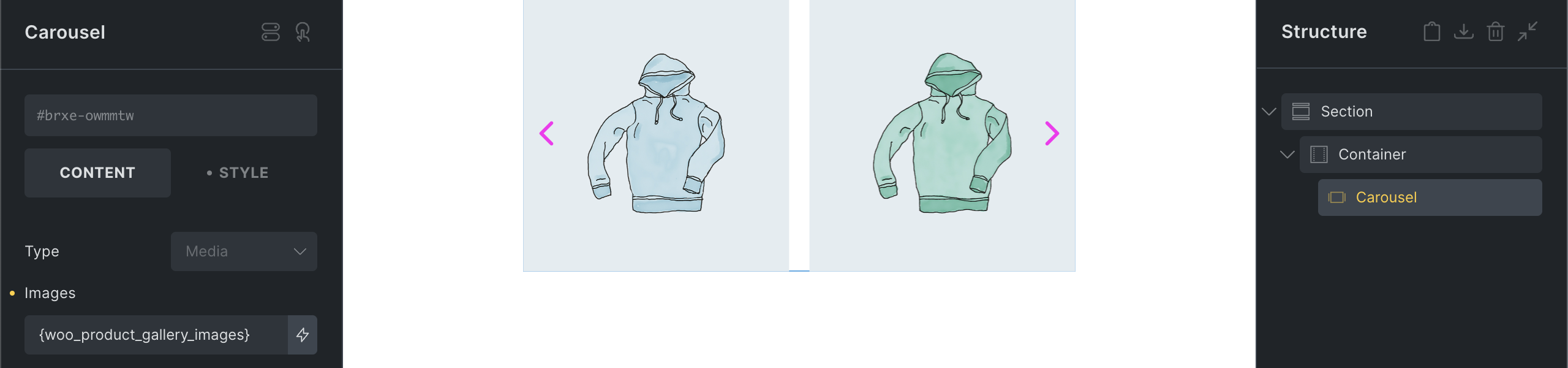
Add the :value to return the image IDs, separated by a comma, for use inside a custom query loop, etc.
Documentation: https://academy.bricksbuilder.io/article/woocommerce-builder/#dynamic-data
New interaction: Toggle Offcanvas
Previously, the only fully accessible solution to toggle an Offcanvas in Bricks was through the “Toggle” element.
The new “Toggle Offcanvas” interaction allows you to toggle any Offcanvas element on your page.
Breaking changes
Jetengine’s checkbox values only returned true or false, which is somewhat meaningless. Bricks now allows users to output the checked options label like ACF does. Use the DD :value filter to output the option values instead.
The “Related Posts” element’s new “Title” setting requires a slightly different HTML structure to wrap the title and posts within the element. This is only relevant if you added custom CSS to the “Related Posts” element.
Other noteworthy changes
- Background video: New “Poster” setting
- Breadcrumb: Support date, month & tag archive pages; New structure controls
- Image control: “External URL” supports dynamic data and has been renamed to “Custom URL”
- Integrations: Support Rank Math & Yoast Content Analysis
Full changelog
- New element: Back To Top (nestable)New
- Posts: Setting to link the entire postNew
- Context menu: Copy and paste element conditions & interactionsNew
- Dynamic Data picker: Pin & save tags; Toggle categoriesNew
- Dynamic Data: New tag: woo_product_gallery_imagesNew
- Related Posts: New “Title” settingNew
- Accessibility & FAQ schema for Accordions & Tabs (flat & nested)New
- Background video: New “Poster” settingNew
- Breadcrumb: Support date, month & tag archive pages; New structure controlsNew
- Builder: Make toolbar keyboard accessible (ALT/OPTION + T; TAB)New
- Builder: Open query loop in control panel after clicking icon in structure panelNew
- Builder: Panel pages: Clear input iconNew
- Builder: Show notification with HTTP error if save failedNew
- Bricks settings: “Query max results” to limit query loop results in the builderNew
- Comments element: Set form title HTML tagNew
- Custom Auth Pages: WordPress authentication page accessNew
- Global Classes: TrashNew
- Image control: “External URL” supports dynamic data and renamed to “Custom URL”New
- Integrations: Support Rank Math & Yoast Content AnalysisNew
- Interactions: New action “Toggle Offcanvas”New
- Nav Menu: New “Active Border” control for mobile menuNew
- New filter: bricks/get_element_data/maybe_from_post_idNew
- New filter: bricks/query/init_loop_indexNew
- Polylang & WPML: Add language prefix to taxonomy term options (builder)New
- Post Title: New spacing and typography controls for prefix/suffixNew
- Reading time: New setting “Characters per minute” (useful for Persian, etc.)New
- Textarea fields: New “resize” control (Form, Comments, Product reviews)New
- Translation: Greek (new)New
- WooCommerce: New setting: “AJAX add to cart” error actions “Scroll to error” or “Redirect to product page”New
- Bricks settings: Form submissions access (by user role or individual user)New
- Bricks settings: Template thumbnail admin column width & heightNew
- Filter – Range: New slider controls & fix min/max input overlayNew
- Query Filters – New “Remove all index jobs” button (use if indexing is stuck)New
- Query Filters: New element “Filter – Active Filters”New
- Query Filter – Submit: New setting “Hide if no active filters” (type: Reset)New
- Query Filters: Source “Taxonomy” allow include, exclude, order byNew
- Query Filter – Checkbox: Hierarchical “Auto Check/uncheck children” settingNew
- Query Filters: New interaction trigger “Filter options: Empty” and “Filter options: Not Empty”New
- Query Filter – Radio: New Hide “All” setting; Filter is toggleable by default nowNew
- Query Filter – Checkbox: Button modeNew
- Query Filter – Search: “Clear Input” iconNew
- Dynamic data tag: term_taxonomy_slugNew
- Builder: :hover selected, but CSS not applied on canvasImprove
- Builder: Performance improvementsImprove
- Builder: Pages panel :focus-within stylingImprove
- Carousel, Sliders, Testimonials: Add arrow top placeholder value (50%)Improve
- Condition: Set on Dropdown “Content” element causes console errorImprove
- Custom Auth Pages: Detect WooCommerce auth pages to prevent redirect conflictsImprove
- Form element: Email validation (without domain) on submitImprove
- JetEngine: Checkbox always returns true or false as a valueImprove
- Link control: Add dynamic data support to URL parametersImprove
- Nav menu/nestable: Anchor links active menu itemImprove
- Nav menu, Nav nested & Offcanvas elements: Trap focusImprove
- Nav nestable: Mobile menu visible after window resize eventImprove
- Popups: Generate nonce through AJAXImprove
- Post Title: Prefix/suffix block via CSS, not div nodeImprove
- Query Sort/Filter & Load more & Infinite scroll: Generate nonce through AJAXImprove
- Query loop: SEO issue with query trail if query uses “a” tagImprove
- System information page: Add wp_remote_post check (to debug Query filters index)Improve
- Video element: Keyboard-accessible with overlay and icon settingsImprove
- WPML: Don’t show deleted text (ATE)Improve
- WPML: Popup interaction not working on translated pageImprove
- Builder: Add variable picker to aspect ratio controlImprove
- Builder: Select control “x” icon gets tiny when text is longImprove
- Filter – Select: Remove Placeholder typography controlImprove
- Filters: Source and Taxonomy should be togetherImprove
- Posts element: Set aria-hidden and tabindex for redundant linksImprove
- Query loop control: Add search to template dropdownImprove
- Builder: a[Link] info still visible after changing HTML tagImprove
- Filter – Search: Clear icon does still visible after resetting filtersImprove
- Popups: Focus does not return to trigger element after closing popupImprove
- Skip link: Remove redundant aria-labelImprove
- ACF: New field with Object Cache enabled: flush_cache logic not triggerFix
- Adobe Fonts: Certain font styles not enqueued because font slug differs from css_namesFix
- Builder: Custom HTML attributes from Bricks filters not rendered on canvas (section, container, block, div)Fix
- Builder: Heading pseudo-class ::first-inline not rendered correctlyFix
- Builder: :hover style persists on canvas if set on classFix
- Builder: Reset styles control removes icon settings (Text link element)Fix
- Builder: User without unfiltered_html cap: Builder save causes data to corrupt (if HTML entities are found in the element)Fix
- Builder: Code and Template element “Render without wrapper” styles shouldn’t apply on canvasFix
- Builder: Code “Sign code” keyboard shortcut reloads the pageFix
- Builder: “Copy styles” from element panel not workingFix
- Builder: TinyMCE “Add media” button not working (Rich text, etc.)Fix
- Comments: Guest can’t see unapproved comment if post has no approved commentsFix
- Divider element: Theme styles overwritten when using external stylesFix
- Filter (AJAX): Unfiltered query after using browser back buttonFix
- Filter – Radio: No .active class applied when using “Sort” modeFix
- Filter – Search: Missing class stylesFix
- Filter – Range: Division by zero errorFix
- Filter: Breaks if the loop has an offsetFix
- Form element: Width placeholder shows value from smaller breakpointFix
- Form element: Mailchimp “Groups” options empty after adding Mailchimp as an actionFix
- Form element: Login redirect action not working when redirect_to param is in the URLFix
- Form element: DD tag ‘url_parameter’ not working in custom redirect URLFix
- Form element: Attributes wrong, if checkbox field required and checkedFix
- Form element: Undefined array key “administrator” (if selected as default role)Fix
- Icon List: Label not rendering if set to “0”Fix
- Link control: Dynamic data tag incorrect on Woo shop pageFix
- Link to non-existing category breaks page/templateFix
- Link type taxonomy: aria-current not set in navigationFix
- Map element: Map not clickable (no API key)Fix
- Map element: Custom style not working and setting change not reflected on the canvasFix
- Nav Menu: Mobile menu selectors too specificFix
- Nav menu in dropdown content gets default styling (on canvas)Fix
- Nav nestable: Text link global class added twice (on li and a, instead of only a)Fix
- Nested query loop: Incorrect value fetched for DD tag (on archive)Fix
- Offcanvas element: Hidden inside sticky slide-up headerFix
- Offcanvas: Offset “Left” direction issue (RTL)Fix
- Page not scrollable on mobile: Sticky header and menu opened, but zoom in/out or back button (iPhone)Fix
- Popup: Unable to tab through popup content, when element has “inert” attributeFix
- Post navigation: Styling issues (RTL)Fix
- Product gallery: Thumbnail images changed if show_variation event emit by related products loopFix
- Query loop: Item is a link and the “not found” template contains a link, the result is nested a linksFix
- SEO: Wrong og:url on archive pagesFix
- Shortcode element: Header/footer template IDs not renderedFix
- Sidebar element: PHP warningFix
- Social Sharing: Remove default margin on li (RTL)Fix
- Sticky header: Overflow issue with sticky-on-scroll and slide-up (plus offcanvas or overlays in header)Fix
- Translation (de_DE): Render header/footer are swappedFix
- Using email in adds ‘mailto:’ automaticallyFix
- WP admin console error: bricksAdminMaintenanceTemplateListenerFix
- WPML: “AJAX add to cart” text is not translatableFix
- WPML: Builder language overwrittenFix
- WPML: Conflict with media translatorFix
- WPML: No Bricks data after ATE translationFix
- WooCommerce: Quick View AJAX add to cart for variable product not showing option (search results page)Fix
- WooCommerce: Quick View not working with “start animation” interactionFix
- WooCommerce: Up/Cross-Sells: Wrong max products placeholder/posts per pageFix
- WooCommerce: Account addresses & edit has wrong title selectorFix
- Popup (AJAX): Context ID not working on archive pageFix
- Builder: Context menu “Edit Template” link not workingFix
- Filter – Checkbox : Count position is on the wrong side (RTL)Fix
- Filter – Range: Bar moves from opposite direction (RTL)Fix
- Form element: Send to email not using correct email (when using ACF relationship)Fix
- Form submission: PHP error (variable name typo)Fix
- Form: Checkbox & radio fields label show, even if disabledFix
- Image element: Background image not displayed in query loopFix
- Offcanvas: Type “Offset” not working from right (RTL)Fix
- Builder: Click on query loop icon in structure panel not working if active panel tab is STYLEFix
- Builder: Structure panel z-index issue due to arrows overflowing panel headerFix
- Tabs/Tabs Nestable: Home/End key bug that causes page scrolling during focus navigationFix
- Builder: WP auth modal CSS is missing if “dashicons” are dequeuedFix
- Live Search: Not closing results, if “display” is set on a containerFix
- Range Filter – Slider layout broken on term pagesFix