
This release, just shy of 100 changes, introduces dozens of fixes and improvements, plus multiple significant new features we can cross off our roadmap. Let’s have a quick look at the highlights of Bricks 1.11.1.
Password Protection
With Bricks, you can now natively password-protect specific pages, posts, custom post types, or your entire website without additional plugins.
This new, experimental feature lets you create a password protection template that is automatically populated with an example password form. Use this form as a starting point for a fully custom-designed password protection layout. Schedule when password protection is active, specify password management methods, etc.
Documentation: https://academy.bricksbuilder.io/article/password-protection/
Masonry layout
Create visually appealing masonry layouts on all layout elements (sections, containers, blocks, divs).

This feature, powered by IsotopeJS, can be customized for responsive designs by adjusting columns and spacing at different breakpoints. It works well with query loops, making it ideal for dynamic posts, products, or other content grids. Add custom animations while disabling the default masonry animations.
Documentation: https://academy.bricksbuilder.io/article/masonry-layout/
Responsive control indicator
A new responsive control indicator shows which controls have or can have different values at different breakpoints, depending on your settings.
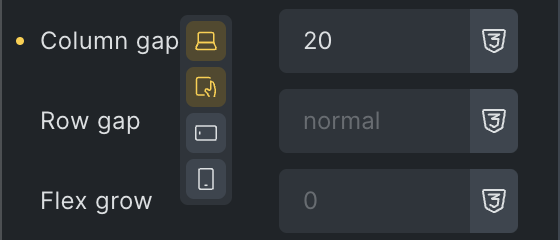
Bricks provides multiple options for when to show this indicator, which you can set under Bricks > Settings > Builder > Control panel > Responsive control indicator:
- Show if any value exists (Default)
- Show if a non-base breakpoint value exists
- Show on all responsive controls
- Disable
Documentation: https://academy.bricksbuilder.io/article/responsive-editing/#responsive-control-indicator
Query loop: More “order by” options & select multiple options
Previously, ordering a query was only possible using one option. Now, you can select multiple “order by” options and “order” those individually. Plus, more options are available too. You can even add your own.
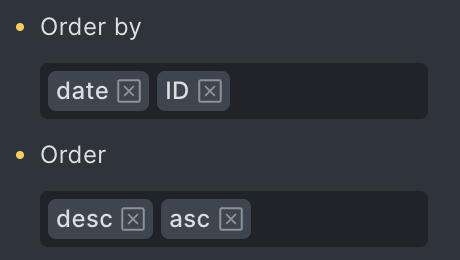
Documentation: https://academy.bricksbuilder.io/article/query-loop/#enhanced-ordering-options
WooCommerce Conditions
Conditions in Bricks just got a significant upgrade for all WooCommerce stores. You can now choose from a plethora of WooCommerce-specific conditions to render your elements. Choose from the product type, sale/stock/new status, to ratings, categories, and tags. The ability to conditionally render your store content just reached a new level.

Query filter: Custom fields integration
Bricks now supports populating the checkbox, radio, select, and datepicker fields from ACF and Meta Box in your query filters.
Learn how to enable and use this opt-in feature at https://academy.bricksbuilder.io/article/query-filters/#custom-fields-integration
Dynamic data: New @sanitize key-value pair
Control the sanitization method applied to any dynamic tag within a “text” context.
By default, all dynamic tags are sanitized using wp_kses_post, which helps secure output by stripping unwanted HTML and scripts. On the flip side, this strips out tags you might want to keep, such as a shortcode that outputs JavaScript, which could originate from a form plugin shortcode that you stored in a custom field.
Before Bricks 1.11.1, this JavaScript would be sanitized, preventing the form from functioning when the field is output via a dynamic data tag. The new @sanitize DD feature gives you control over the sanitization of your DD tags.
Head over to https://academy.bricksbuilder.io/article/dynamic-data/#sanitize for code examples and more details.
Lock code signatures (via PHP constant)
Have you finished adding any executable code and want to prevent anyone from adding new code?
Starting at Bricks 1.11.1, you can lock down code signatures by setting the new PHP constant BRICKS_LOCK_CODE_SIGNATURES to true.
Code example: https://academy.bricksbuilder.io/article/code-signatures/#lock-code-signatures
Edit with Bricks: Link to Woo templates in the admin bar
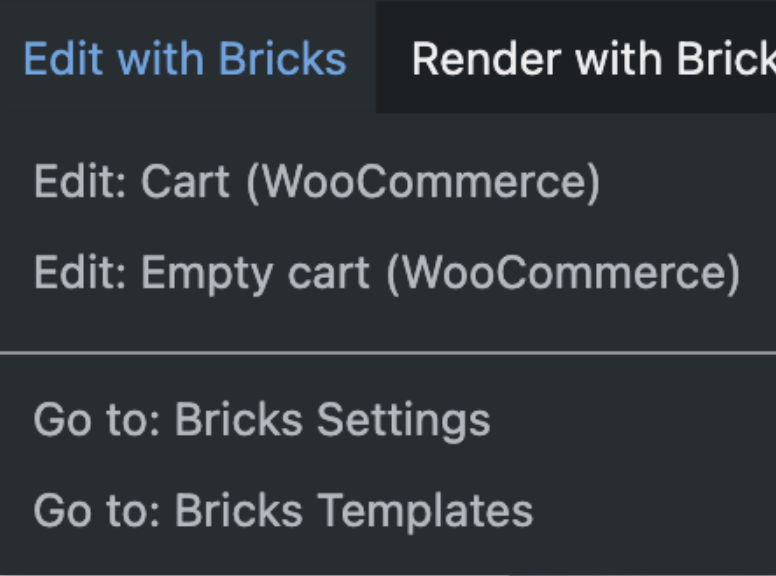
Jump into editing the Woo template of the page you view on the front end with one click in your admin bar.
The following example shows the edit template links when viewing the cart page:
WooCommerce: Product up/cross-sell “Cart Cross-sell” setting
If you use the Product up/cross-sell on your cart page, set the “Type” to “Cart Cross-sell,” or it will no longer work there!
Other highlights
- New filter:
bricks/render_query_loop_trail - New filter:
bricks/builder/codemirror_config - New filter: bricks/content/tag
- New Typography setting:
text-wrap - WooCommerce: New DD tag
woo_product_badge_new
Full changelog
- Password Protection (Template Type)New
- Masonry layout (Style > Layout)New
- WooCommerce: ConditionsNew
- WooCommerce: New element “Checkout Coupon” & “Checkout Login”New
- Query Loop: More “order by” options & select multiple optionsNew
- Typography: New text-wrap controlNew
- Builder: Responsive control indicatorNew
- Query filter: Custom field integration (ACF, Meta Box)New
- Dynamic data: New @sanitize key-value pairNew
- Flex align setting: New ‘auto’ optionNew
- Form element: New “Max length” input settingNew
- Form element: New setting to hide form message after .. msNew
- Posts element: New “Link image alt text” settingNew
- Rating element: New “Additional properties” setting (for schema)New
- Search element: New “Label” settingNew
- New constant: BRICKS_LOCK_CODE_SIGNATURESNew
- New filter: bricks/render_query_loop_trail (to disable .brx-query-trail node)New
- New filter: bricks/builder/codemirror_configNew
- Theme Styles: Alert muted border settingNew
- Theme Styles: Button outline controls & info, success, warning, danger, dark, muted stylesNew
- WooCommerce: New DD tag “woo_product_badge_new”New
- WooCommerce: Admin bar “Edit with Bricks” links to Woo templatesNew
- WooCommerce: Product up/cross-sell: New “Cart Cross-sell” settingNew
- WooCommerce: Add to cart element: New regular & sale price typography settingsNew
- New filter: bricks/content/tagNew
- Accessibility: Comments element missing textarea label (Source: WordPress)Improve
- Accessibility: More visible default :focus-visible stylingImprove
- Author element: Rename “Show Website” label to “Link to website”Improve
- Builder: Add label to text-shadow popup (for indicator)Improve
- Builder: Canvas inline text editing should use “strong” instead of “b” tagImprove
- Button: Hide Icon typography control if icon is an SVGImprove
- Color palette: Show “Clear” button only when a color is setImprove
- Skipped heading levels for author name, comments, and related posts & new HTML tag setting for author name (a11y)Improve
- Form element: Email inconsistent line break handling between main and confirmation emailsImprove
- Heading: Wrong custom tag placeholderImprove
- Hide “View cart” button placeholder valueImprove
- Metabox relationship improvement to use current page/post as fallback context (inside nested loop)Improve
- Nav menu & Nav (Nestable): Navigation via arrow, home, end keys (a11y)Improve
- Nav (Nestable): ::before pseudo widthImprove
- Nav (Nestable): Opening content on click/hover don’t close previously opened contentImprove
- Performance: Optimize user query in conditionsImprove
- Query filter element: Input tag should self-closeImprove
- Rating element: If rating is higher than max. rating use max. rating valueImprove
- Testimonials element: Use blockquote tag instead of div (a11y)Improve
- Theme Styles: WooCommerce button styles should also apply on non-woo pagesImprove
- Accessibility: Accordion (Nestable), Tabs, Tabs (Nestable)Fix
- Accordion (Nestable): Empty FAQ schemaFix
- Builder: Attributes indicator not showing on all breakpointsFix
- Builder: Panel expands unexpectetly on class changeFix
- Builder: Preview window opens in same tab instead of new tabFix
- Conditions: Meta Box empty relationship labelFix
- Copy & paste styles betwen element ID & global class and vice versaFix
- Custom CSS class name gets modifiedFix
- Custom CSS: Wrongly applied after switching between classesFix
- Custom CSS: %root% refers to old class name after class was renamed in class managerFix
- Dropdown & Nav menu: Set mobile menu stroke inline on SVG pathFix
- Control: text-align “exclude” not working correctlyFix
- Form element: Can’t retrieve form actions in query loopFix
- Form element: Autocomplete attribute info tooltip should be on/offFix
- Form element: Can not upload .ai and .eps filesFix
- Form element: Dynamic data for “Directory Name” is not workingFix
- Form element: Submit icon spins in the wrong directionFix
- Icon element: Custom attribute “class” generates fatal PHP errorFix
- Image & Video element: “Custom URL” with dynamic tag + static text unable to parse correctlyFix
- Infinite Scroll: Double AJAX loader if nonce expiredFix
- JetEngine: Relation meta data not working with dynamic data tagsFix
- Nav nestable: Mobile menu close toggle not showing on canvasFix
- Nestable elements: Direct child elements render as DIV instead of default tag (i.e. heading inside Back to Top)Fix
- Polylang: Infinite query loop not working when templates are not set to be translatableFix
- Popup template settings not applied when added via Template elementFix
- Posts element: Alternate images + direction column on mobile doesn’t workFix
- Product Gallery: Wrong margin on thumbnail slider (RTL)Fix
- Product Stock element: Return empty if variable product manage stock level on variationsFix
- Query filter: Not working if target query uses dynamic data tag in query settingsFix
- Query loop (PHP): order_by, posts_per_page gets overridden (post type: product)Fix
- Query loop: ACF Repeater > Group > Repeater has no resultsFix
- Query loop: Order by possible duplicate results with load more or query filtersFix
- Rating element: Inside query loop, the first element does not render stars when using dynamic data (in builder)Fix
- Remove html height 100% which caused site background image to not cover whole bodyFix
- SVG element: Source “Code” in header renders incorrectly in builder on other pagesFix
- Slider (Nestable): Wrong order of slides inside nested tabsFix
- Sticky header: Transition overrides nav nestable & dropdown icon transitionFix
- Table of Contents element: Fix TOC initialization at different breakpointsFix
- Tabs (Nestable) & Accordion (Nestable): Suppress DOMDocument PHP WarningFix
- Tabs element: Open tab via anchor link: First item always openFix
- Theme Styles: Link selector :hover issueFix
- Unable to get code signature if using Template and Loop + Post Content (Source: Bricks)Fix
- WPML: Page settings not copied to translated pageFix
- WooCommerce: Account – Edit Address: Margin applies to wrong selectorFix
- WooCommerce: Notice error message border styling issue (RTL)Fix
- Fix PHP 8.2+ strpos deprecated warning when using DD link for looping “a” tagFix