
A big “Thank You” goes out to all the 2.0-alpha testers. You shared a lot of great improvements and discovered all those bugs; we didn’t.
This 2.0-beta release tackles those improvements and bug reports, as well as some important new features, that didn’t make it into the alpha release.
The manual download is available in your Bricks account at https://my.bricksbuilder.io/ for testing and providing feedback.
New property types for component variations
Components received another upgrade by introducing the following new property types, which bring new component variation capabilities to Bricks:
- Select: Connectable with any select/text/textarea control
- Toggle: Connectable with any toggle control, incl. the new “Hide element” toggles (showcased below)
- Global classes: Connectable with the global classes control of any element inside your component.
Examples and more in-depth explanation: https://academy.bricksbuilder.io/article/components/#variations
The property form has been streamlined to improve productivity.
Specific properties can now be edited by hovering over the property on the instance, then clicking the “edit” icon.
Hide element (builder/frontend)
Easily hide any element in the builder and/or frontend with one click from the context menu, or by clicking the “eye” icon in the element panel header.
Connectable through the new “Toggle” property, it allows for component variations by showing/hiding elements inside the component instance.
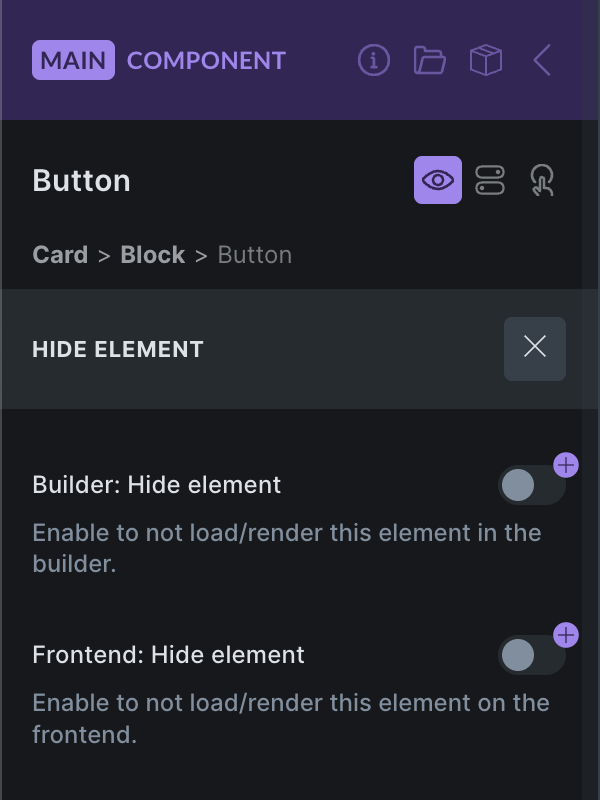
The new “Hide element” doesn’t visually hide it via CSS. Instead, the element is not loaded/rendered at all.
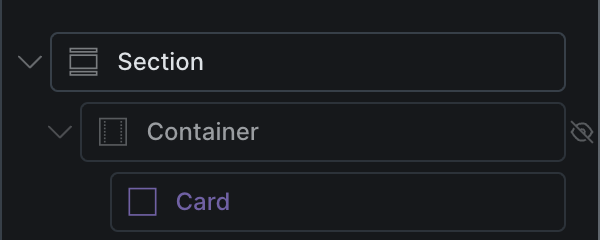
A “strike-through-eye” icon in the Structure panel will show next to any element that’s hidden in the builder/frontend:
Builder: New Render Logic
In this beta release, we revisited the builder render logic to reduce element render and API calls, resulting in a better, more performant editing experience.
Interactions for WooCommerce events
There are new WooCommerce interactions for the following events:
- Added to cart
- Remove from cart
- Cart updated
- Coupon applied
- Coupon removed
Not Woo-specific, but there’s also a new interaction for Clear form.
Variable Manager: Color editor
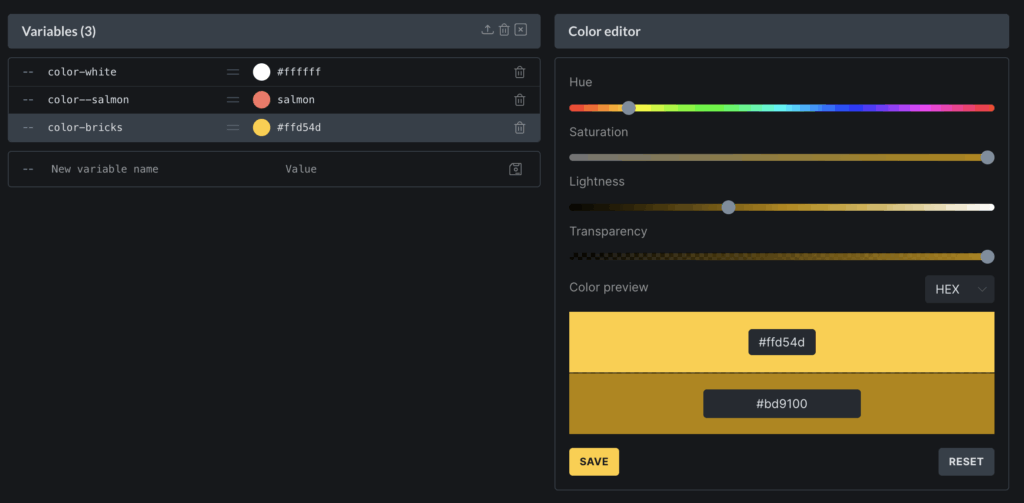
A color preview appears next to the value if your variables contain a valid color value.
Clicking the value brings up the new color editor in the right-hand column of the Variable Manager. From there, you can easily tweak the color value to your liking.
Corrupt data checker (orphaned elements)
A new tool in Bricks lets you check for orphaned elements on builder load and save to prevent corrupt data. Meaning data that has no valid parent element.
Enable this tool under Bricks > Settings > Builder > Check for corrupt data (orphaned elements).
This checker can also be manually enabled by adding ?check=orphaned to the builder URL.
Icon Manager: Set background-color for custom icon set
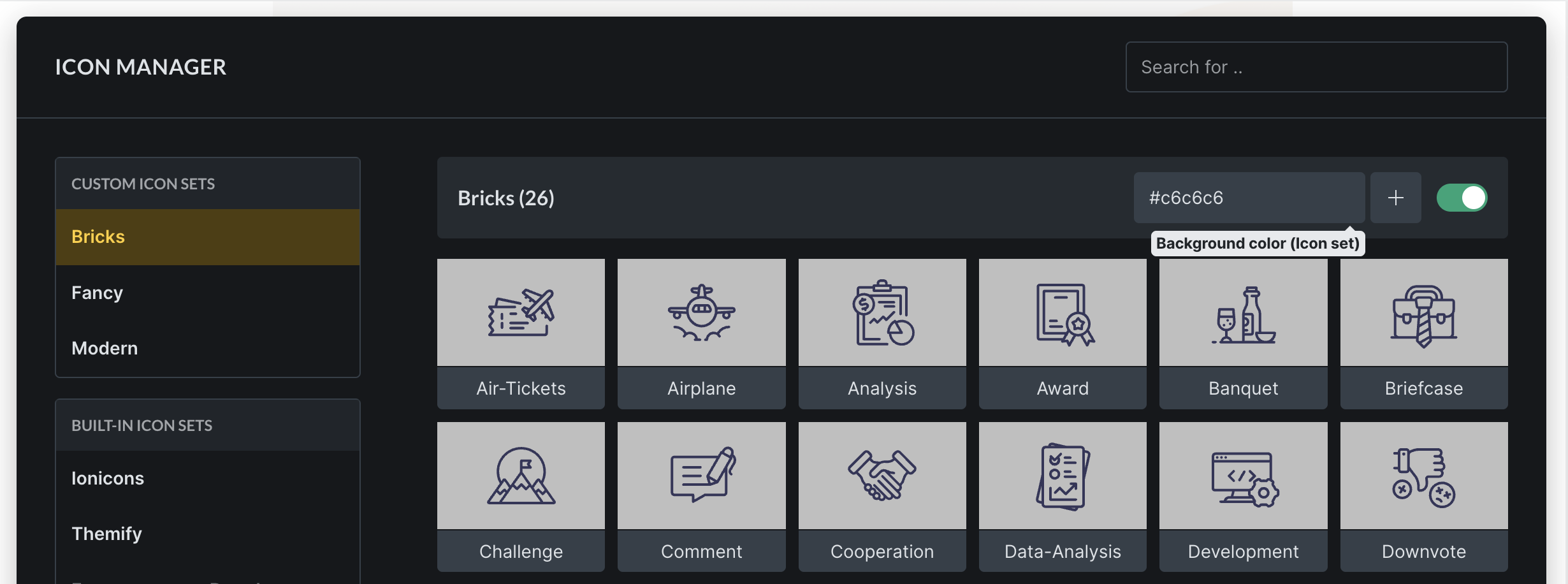
You can now define a custom background color for every custom icon set. This color is applied to the builder control panel to improve the contrast between the SVGs and the background wherever needed.
#c6c6c6There are 100+ other changes in this beta release. So make sure to check out the full changelog below.
Please help us test this beta release, after which we aim to release the final Bricks 2.0 one-click update. 🙏
Full changelog
- Bulk edit: Show “Common classes”New
- Builder: New Render LogicNew
- Bricks setting: Builder > Check for corrupt data (orphaned elements)New
- Icon Manager: Set background-color for custom icon set (in control panel)New
- Interactions for WooCommerce eventsNew
- Masonry layout: Horizontal order setting (from left-to-right)New
- Nav Menu: Ability to change aria-label on mobile toggleNew
- New component property type: Global classesNew
- New component property type: SelectNew
- New component property type: ToggleNew
- New filter: bricks/placeholder_imageNew
- New interaction: Clear formNew
- Variable Manager: Color editor next to variable valueNew
- Support wp_body_open hookNew
- Builder: ACF Flexible Content fields: Group missing in dynamic data pickerImprove
- Builder: Improve toolbar & panels on small screens (< 768px)Improve
- Builder: Interactions panel styling improvementsImprove
- Bulk-edit: Context menu convert not applied to all selected elementsImprove
- Bulk-edit: Remove “Save as template” option from context menuImprove
- Bulk-edit: Apply active pseudo class styles to all selected elementsImprove
- Classes are not imported alongside componentImprove
- Clear active pseudo class when switching to inherited settingImprove
- Context menu “Insert” into all selected elementsImprove
- Font Manager: Selecting a favorite font hides all other local fontsImprove
- Form user registration: Unable to auto-generate username with special charsImprove
- Form: Honeypot should use “off” for autocompleteImprove
- Icon manager & icon control: Light backgroundImprove
- Icon Manager: “Insert” action (hover over icon in set)Improve
- Image: figure.brxe specificityImprove
- Maintenance Mode settings: Conditionally show “Render popups”Improve
- Modified settings: Show unmodified settings (background, typography)Improve
- Nav nestable: UX Findings/General IssuesImprove
- Offcanvas: Transition not applied to backdrop when closingImprove
- Reduce API calls in the builder (render_element)Improve
- Selector Detector: Select any node within the active element (i.e. Block > Heading)Improve
- Selector UI: Add “Paste styles” action to quick access menuImprove
- Show Style tab indicatorfor pseudo classesImprove
- Template screenshots: Transparent backgroundImprove
- Update Google FontsImprove
- Variable/Class Manager: Move using category/item via the text instead of an iconImprove
- Variation Swatches: Use product variation image as fallback optionImprove
- WooCommerce: Only remove “Default Page title” if an active template is found on current endpoint (not current page)Improve
- WooCommerce: Product Gallery need trigger rezise on window load (style fully loaded)Improve
- Allow changing the builder access capability of administratorsImprove
- “Regenerate all code signatures” confirm modal encoding issueFix
- ACF: True False not showing correct options (in Query Filters Custom Field Integration)Fix
- Bricks lazyload causes WC API endpoint image broken (Email)Fix
- Builder: Add class to element, then undo history: Class still selectedFix
- Builder: Components with nestable elements (accordion, slider, tabs) render issuesFix
- Builder: Control margin inside popup controlFix
- Builder: WP admin bar styles errorFix
- Bulk select/edit: Paste styles misses elementsFix
- Bulk-delete: Element doesn’t exist messageFix
- Bulk-select on canvas not working (x-template elements like Heading, Button, etc.)Fix
- Builder: Selector UI: Missing actions for element ID (in dropdown)Fix
- Builder: Selector UI: Class rename adds empty character (hyphens or underscores)Fix
- Components: Attribute value set to “0” via property renders as emptyFix
- Builder: Hung up if query loops in static area include same section templateFix
- Components: Carousel with multiple instances on a page doesn’t initializeFix
- Components: Element doesn’t exist after going back (Builder)Fix
- Components: Property group layout issue (Builder)Fix
- Components: Query loop (type PHP) not workingFix
- Convert component root doesn’t update instance (Builder)Fix
- Custom CSS with !important and space cause incorrect Google Font URLFix
- Code editor: Custom CSS/code doesn’t show in the field after full screen exitFix
- Delete a property inside a group removes other property from first group (Builder)Fix
- Element breadcrumbs: Not showing for non-components (Builder)Fix
- Elements using repeater controls won’t populate from component propertiesFix
- Fix: color input label line-heightFix
- Font Manager: Downloaded Google Font files incorrectFix
- Font Manager: Google Font download incorrect font-family before builder reloadFix
- Font Manager: Font style changes to italicFix
- Form: Using “File” field and {{all_fields}} as email content returns an errorFix
- Icon control: Custom icon style controls not visible without SVG Upload permissionFix
- Image mask: PHP error when using dynamic data in query loopFix
- Interactions: Change action leaves “CSS selector” field visible (Builder)Fix
- Bulk-select: Not working for componentsFix
- Nested Components: Element doesn’t existFix
- Nested Components: Missing Icon StylesFix
- Offcanvas: Open on page load (prevent in builder)Fix
- Offcanvas: First focusable elementFix
- Polylang: post_date:human_time_diff uses default language in infinite scrolling & paginationFix
- Property type “Image gallery”: Canvas not updated after removing image via icon (on the instance)Fix
- RTL/LTR: Set builder direction setting not respectedFix
- RTL: Scaled down canvas does not center properlyFix
- Remote template: Unable to insert with empty color paletteFix
- Responsive control indicator: “Show on all” shows no iconsFix
- Select component on canvas and change property value doesn’t update the component dataFix
- Selector UI: Class not assignable via keyboardFix
- Selector UI: Missing “content” property for before/after pseudo-elementFix
- Social Sharing URL adds subfolder twice (subfolder install)Fix
- Template Term condition brokenFix
- Theme Styles: Colors > Border color overrides Links/Blockquote border colorFix
- Theme Styles: Import icon not workingFix
- Toggle element: aria-expanded and active state on canvas not working if wrapped inside a deeper divFix
- Use Toggle on Nav Nestable Menu causing auto-focus on the form when closing (mobile)Fix
- User profile settings: Builder access locked if the user has manage_options capabilityFix
- Vimeo “direct link to video file” does not workFix
- Visual Grid Builder: Builder broken in some casesFix
- Visual Grid Builder: Not working in mobile firstFix
- Visual Grid Builder: Disable when bulk-editing elementsFix
- Visual Grid Builder: Shifted column headerFix
- Visual Grid Builder: Rendering/overflow issuesFix
- Warning in Query Loop with “No Results” templateFix
- WooCommerce: Cart Content Loop doesn’t fire (woocommerce_cart_item_visible hook)Fix
- WooCommerce: Single Product page unable to use Bricks Video lightboxFix
- WooCommerce: Account – Orders: Default row border is not set on the first columnFix
- WooCommerce: Add to cart: Hiding if the product is out of stock causes incompatibilities with other pluginsFix
- Z-index issue with spacing controls and search setting (Builder)Fix
- Add to cart element: Attribute name vertical alignment topFix
- Filter Empty Interaction should exclude placeholder optionsFix
- Filter Checkbox: Filter by Post Type not working when merging query_varsFix
- Link controls in component not working (if connected to property)Fix
- Nav nestable in component: Can’t open mobile menu (missing .brx-open styles)Fix
- No property found message not showing in nested componentFix
- TOC: Not working inside nested accordion, tabs, dropdownFix
- Variation Swatches: Default tooltip color different in builder than frontendFix
- Image element: Not shown inside Dropdown, if converted to componentFix
- Components: Attribute value not updating, if there is a default one, before connecting it with propertyFix
- Icon does not show if component is from Template, using default value in propertyFix
- Search settings bar: Increase z-indexFix
- Selector detector: Guides still visible after clicking CancelFix