
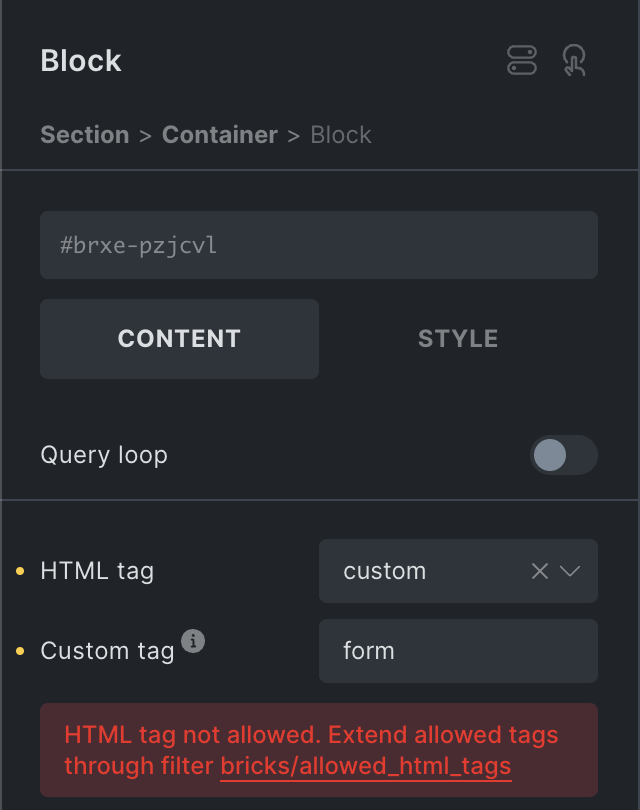
This quick follow-up release introduces a new filter bricks/allowed_html_tags that allows you to extend the list of allowed HTML tags.
Starting at version 1.10.2, Bricks restricts the allowed HTML tags according to WordPress core. So, certain HTML tags such as form are no longer allowed out-of-the-box.
If you see an “HTML tag not allowed” error message next to your “Custom tag” value, please programmatically add this HTML tag to the list of allowed HTML tags.
Only allow HTML tags that are considered safe, as anyone with builder access can use them!
Documentation: https://academy.bricksbuilder.io/article/filter-bricks-allowed_html_tags/
Full changelog
- Builder: “Copy styles” action in active selector barNew
- Video element: Disable download, fullscreen, remote playback (via controlsList, not supported by Firefox)New
- Lightbox video: Disable controlsNew
- Builder: Show “HTML tag not allowed” error message for not-allowed HTML tagsNew
- New filter: bricks/allowed_html_tags (to extend allowed custom HTML tags)New
- Lightbox caption: Remove fallback to alt attribute valueImprove
- Map element: Click map on canvas doesn’t open settings (no API key)Improve
- Maintenance mode: Show popups for users with bypass capabilityImprove
- Builder: Code control not re-initialised after panel tab change (using disable auto-expand)Fix
- Comments element: Guests can’t see their unapproved commentFix
- Element breadcrumbs: Custom name with tag not rendered correctlyFix
- Map element: border-radius overflow (no API key)Fix
- Maps element: Dynamic data not working (no API key)Fix
- Template screenshot on “save as template” not workingFix
- Toggle element: Bar color uses wrong selectorFix