
Components (experimental)
Components, probably the biggest missing building blocks in Bricks, are now available as an experimental feature in Bricks 1.12.
Components allow you create reusable and customizable elements for a scalable, consistent, and easy to maintain workflow. Make sure to watch the official Components video below, for a first dive into the world of components in Bricks …
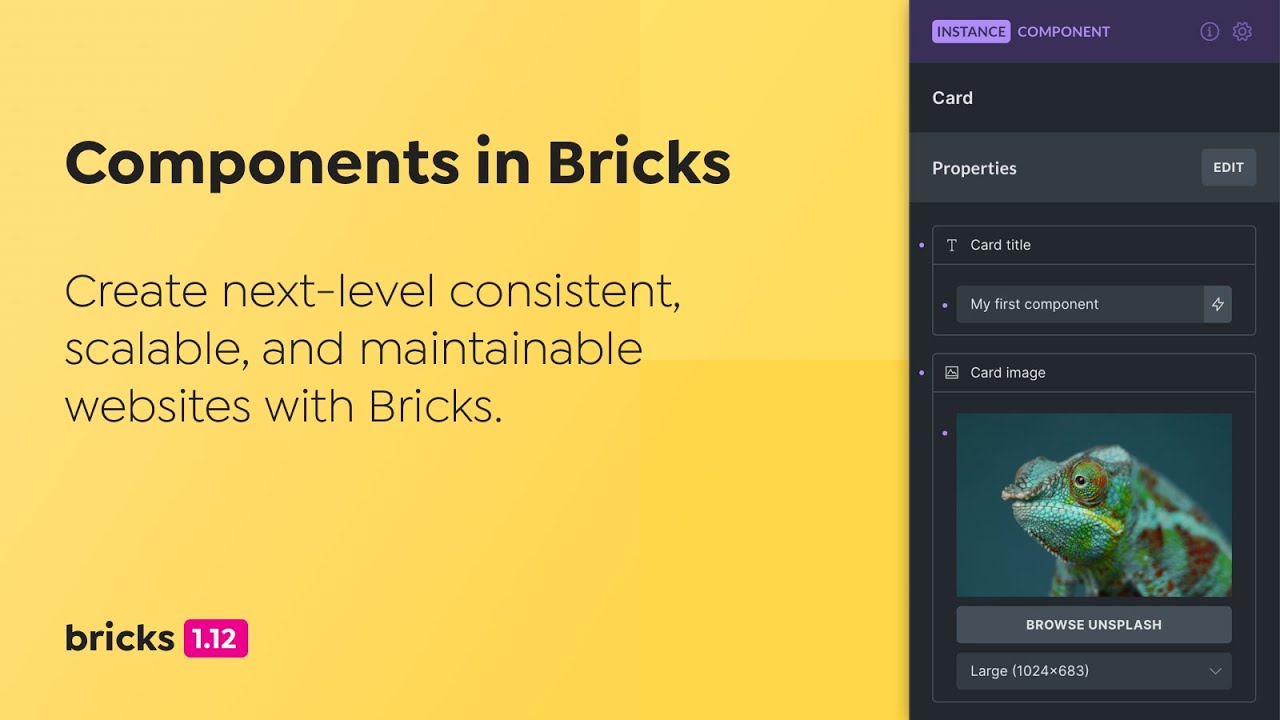
Documentation: https://academy.bricksbuilder.io/article/components/
NOTE: Bricks 1.12 introduces an improved component data structure. Please delete any components created in 1.12-beta.
Query Loop: Include/Exclude support dynamic data
Bricks now supports dynamic data tags in the “Include” and “Exclude” query loop controls.
This lets you include/exclude posts dynamically through dynamic data field values, such as those retrieved from ACF or Meta Box relationship fields, while also combining all other query parameters like meta queries or taxonomy queries.
Documentation & examples: https://academy.bricksbuilder.io/article/query-loop/#include-exclude-dynamic-data
You can also query ACF Gallery fields by setting the post type to “Media” and selecting the ACF gallery DD tag under “Include”.
ACF Gallery example: https://academy.bricksbuilder.io/article/query-loop/#query-acf-gallery-with-random-order
Optimized CSS file loading order to prevent CLS & FOUC
We received various reports about CLS (Cumulative layout shifts) and FOUC (Flash of unstyled content) issues. The root cause being that certain CSS files were loaded/enqueued too late. This has now been resolved in Bricks 1.12. If you still experience any CLS/FOUC issues when using Bricks 1.12+, please let us know.
Cascade layer for Bricks default styles
If you ever ran into a CSS specificity issue with the default Bricks styles, this new, experimental feature, is for you. As Bricks 1.12 introduces a possible solution to this longstanding issue through CSS cascade layers (@layer), which as of December 2024 reach an impressive 96% browser support and “Widely available” Baseline.
For more details about this new feature, how to enable it, and how it works, please head over to https://academy.bricksbuilder.io/article/cascade-layer
Show outer Post Content elements
When editing a page with Bricks that is rendered through a template (e.g. template condition: post type = page) the elements surrounding the “Post content” element were not visible in the builder.
Instead of viewing the entire page as it looks on the frontend only the “Post content” area of the page template was visible. Making it extremely hard to style such pages in the builder.
In Bricks 1.12 you can now see all outer Post content elements in the builder 😎

NOTE: Available for all templates of type “Single”
Context menu: Copy and paste attributes & classes

The context menu contains two more copy & paste action icons for that let you copy & paste all attributes & classes defined on an element. The respective icons only appear if the element contains any attributes and/or classes.
Query Filters: Support term & user queries
Prior to Bricks 1.12 query filters only supported “Post” queries. You can now also filter queries of type “Term” and “User”.
There are also two new user-specific dynamic data tags:
wp_user_role: Returns current user context primary role. Use:valueto return the role slug.wp_user_registered_date: Returns current user context registered date
Global Class Import Manager
When importing classes through the global class manager, through importing a template file, inserting a remote template or copy/pasting elements, Bricks now displays the Global Class Import Manager when new classes or class conflicts with imported classes are detected.
Conflicts are highlighted in red with options to override, discard, or rename the class. You can now also categorize those classes during import.
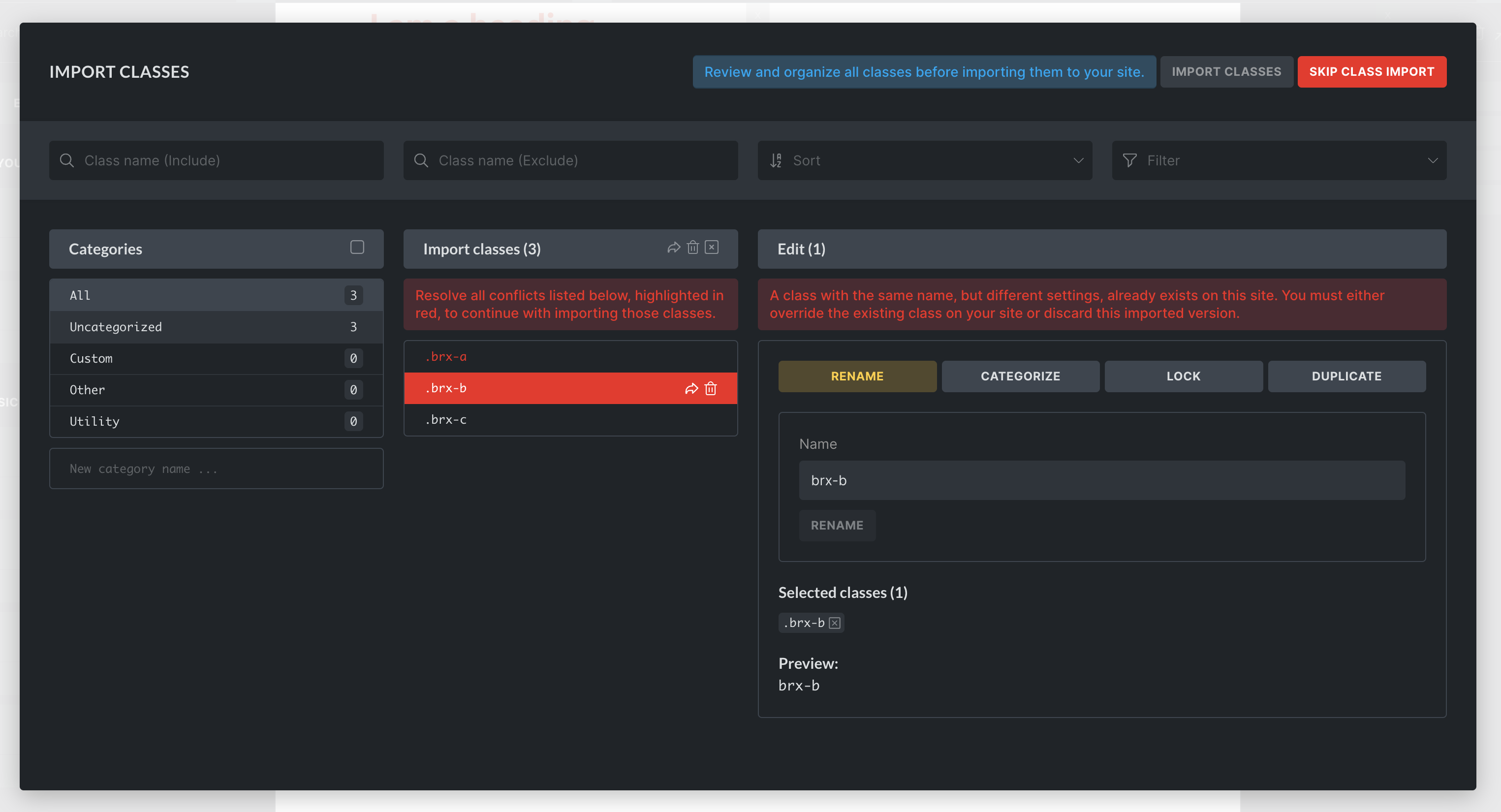
To resolve the conflict for a specific class, hover over or click it, then select the “arrow” icon to override the local class, or the “trash” icon to discard the conflicting class from the import.
If there’s a naming conflict, meaning a class with the same name already exists on your site, you can resolve the conflict by renaming the imported class.
To resolve class conflicts in bulk, select the class conflicts you want to resolve, and use the override/discard icons at the top of the column.
Once all conflicts are resolved you can finish importing the classes by clicking the green IMPORT CLASSES button at the top-right of the global class manager. You can also skip the entire class import by clicking the SKIP CLASS IMPORT button next to it.
Documentation: https://academy.bricksbuilder.io/article/global-class-import-manager/
You can configure/disable the global class import manager under Bricks > Settings > Builder
Other noteworthy changes
- Accordion & Tabs (flat & nested): New default open item setting
- Form: Show/hide password field toggle icon
- Form: New setting “Disable form validation” (input, blur)
- Global Classes Manager: New filters for Used/Unused on this site
- Query Loop: New Infinite Scroll Delay setting
- Image Gallery: New “Lightbox ID” setting (to connect with single images)
- Duplicate post: Bricks setting and filter bricks/use_duplicate_content to disable this feature
Full changelog
- ComponentsNew
- Context menu: Copy and paste classesNew
- Query Loop: Support ACF Gallery (through post type “Media” and “Include” DD tag)New
- Query Loop: More controls for ACF & Meta Box RelationshipNew
- Context menu: Copy and paste attributesNew
- Form field: Show/hide password toggle iconNew
- Query Filters: Support term & user queriesNew
- Global Classes: Resolve conflicts on import (override, discard, rename)New
- Global Classes Manager: New filters for Used/Unused on this siteNew
- Builder: Show outer Post Content elements (Template type: Single)New
- Duplicate post: Bricks setting to disable and Bricks filter “bricks/use_duplicate_content” for more advanced setupsNew
- Accordion & Tabs: Set default open itemNew
- Form: New setting “Disable form validation” (input, blur)New
- Image Gallery: New “Lightbox ID” setting (to connect with single images)New
- Query Loop: New Infinite Scroll Delay settingNew
- Bricks setting: Cascade layer for Bricks default styles (experimental)New
- Accordion: Toggle brx-open class immediately when clicking on accordion itemImprove
- Add to cart: Hide if product is out of stockImprove
- Basic Text: Add HTML tag descriptionImprove
- Builder: Ajaxify term select controls to avoid memory exhausted on term-heavy sitesImprove
- Builder: Attributes set, should trigger Style tab indicatorImprove
- Builder: CSS grid guidelines remain on canvas after grid is unsetImprove
- Builder: Include Bricks Template Bundles & Tags in taxonomy controlsImprove
- Builder: Inline text edit “italic” on canvas use “em” instead of “i” tagImprove
- Classic Editor: Auto-select “Edit with Bricks” tabImprove
- Code element: Move controls above code controls (except “Theme”)Improve
- Compatibility: Events Calendar Pro & Bricks Query FiltersImprove
- Dropdown: Performance lagImprove
- Form: Optimize field validation input event listenersImprove
- Form submissions: Decouple capability from builder accessImprove
- Google Map (no API key): Missing title attribute (A11Y)Improve
- Gutenberg: Display prominent “Edit with Bricks/Gutenberg” blockImprove
- Helper function to reinit active_templates static variable valuesImprove
- Image: Remove picture tag from HTML tag options (auto-set as needed)Improve
- Import pseudo classes & elements (on template import & copy/paste)Improve
- Load filters.min.js only on pages where filters are usedImprove
- Minify splide.min.jsImprove
- Optimize CSS file loading order (prevent CLS, FOUC)Improve
- Query Filters: List Source & Field type controls togetherImprove
- RTL: Builder panel search icon too close to borderImprove
- Remote Templates: Show import indicator until import completedImprove
- Remote Template import: Import entire color palette (instead of only the colors used)Improve
- Rich Text: Paste element with CTRL + V, pastes clipboard content instead of inserting new element (builder)Improve
- WooCommerce: .alignwide causes overflow in Checkout blocksImprove
- Custom auth redirect not working if URL action param set to random valueImprove
- Filter – Search: If typing at a certain speed, some letters are removedImprove
- Image element: Support at least source “Desktop” as lightbox image instead of fallback imageImprove
- Dynamic data tag: Support parenthesis as argument in “echo” tagImprove
- Builder: Sync Global Classes notification error objectFix
- Carousel: Products query PHP warning (undefined array key “fields”)Fix
- Custom auth reroute not working if URL action param set to loginFix
- DD tag used In query loop returns incorrect result in builder (not parsed)Fix
- DD used in query loop inside template doesn’t follow the populate content setting (in builder)Fix
- Duplicated popup & inline CSS when using Popup in loop (inline method)Fix
- Dynamic data: wp_user_ parsed incorrectly in nested query paramsFix
- Fatal PHP error if website folder name contains non-latin charactersFix
- Form: Checkbox/radio field have same ID if duplicated or inserted multiple timesFix
- Global classes sync across subdirectory sites in multisite networkFix
- Helpers::get_element_data failed if the element ID is full integer (also Query Filter element related)Fix
- Interaction doesn’t open correct popup in nested query loopFix
- Masonry layout: Not working in Chrome and if “infinite scroll” is enabledFix
- Populate Content/WPML: Fatal error with deleted postFix
- Popup: Dynamic background inside lop not working (plus PHP warning)Fix
- Popup: CSS selector incorrect in non-loop and different context ID (AJAX )Fix
- Popup: Masonry issue in AJAX-fetched popupFix
- Query Filter: Undefined array key “optionLabel” errorFix
- Query Filter with prefilter option and no results causes filter to be not click- or resettableFix
- Query Filters: Incorrect result on term page when subcategory is selectedFix
- Query Filters: Not working when query loop has “OR” meta queryFix
- Query Filters: ACF user field type generates wrong labelFix
- Query Filters: Incorrect filtering when using Meta Box “Date save as timestamp”Fix
- Query Filters: esc_html on filter value causes incorrect filter resultsFix
- Query Loop: Dynamic data for “Child of” not working for Pages (in builder)Fix
- Query Loop: Meta query with Clause Name doesn’t parse dynamic dataFix
- Query Loop: orderby always uses Date DESC on search result page (doesn’t follow default WP)Fix
- Query Loop: Post taxonomy query with EXISTS condition not workingFix
- Query loop: Certain orderby values not combinable with other valueFix
- Query Loop: orderby “random” not workingFix
- Query Loop: orderby not working when using sorting URL Param (page reload)Fix
- RAW color with dynamic tag + other value not parsedFix
- Remote Templates: Theme Style import fails on first importFix
- Responsive style indicator overlapsFix
- Social Sharing: Overflow due to tooltip (use title attribute instead)Fix
- Template screenshots: Transparent background if background color is defined in theme stylesFix
- Use “query_results_count” DD tag condition on ACF Post Object in nested loop can cause fatal PHP errorFix
- WP admin bar: Don’t select “Render with Bricks” if there’s no Bricks dataFix
- WP auth redirect to use custom error templateFix
- WPML: Template element not translated when there’s no other content on the pageFix
- WooCommerce – Checkout customer details: Remove field causes issue in actual checkoutFix
- Form: Submit button custom SVG icon transformFix
- Taxonomy: PHP warning if linked to non-existing taxonomyFix
- A dynamic tag that returns “0” is considered emptyFix
- AJAX add to cart: No support for custom checkbox/array valuesFix
- Accordion Schema: wrong Accordion Schema: wrong Accordion Schema: wrong Accordion Schema: wrong Accordion Schema: wrong Accordion Schema: wrong Accordion Schema: wrong Accordion Schema: wrong Accordion Schema: wrong Accordion Schema: wrong Accordion Schema: wrong Accordion Schema: wrong Accordion Schema: wrong Accordion Schema: wrong Accordion Schema: wrong Accordion Schema: wrong Accordion Schema: wrong Accordion Schema: wrong Accordion Schema: wrong Accordion Schema: wrong Accordion Schema: wrong Accordion Schema: wrong Bricks 1.12 in loop in loop in loop in loop in loop in loop in loop in loop in loop in loop in loop in loop in loop in loop in loop in loop in loop in loop in loop in loop in loop in loopFix
- Anchor link is active, but .current-menu-item for other links on the same menu still thereFix
- Checkout customer details: Shipping address is removed, if we remove one fieldFix
- Custom URL/Dynamic Data: “author_id” gets replacedFix
- Dropdown: Multilevel keyboard navigation bugFix
- Dynamic data tag with scientific number as argument causes fatal errorFix
- Flatpickr language files loading from wrong URLFix
- Form: Skip HTML/hidden field types from required logicFix
- Gallery: Masonry layout not working on the canvasFix
- Mailchimp: Fix 10 list limit (sync)Fix
- Password Protection: Single template condition affects custom PP renderFix
- Product Stock element: Showing 0 in stockFix
- Query Filters: Bug when filter element is located in draft template or copiedFix
- Query Filters: Double empty value as option if custom field of a post is empty stringFix
- Query: No result template: Class styles not fetched from APIFix
- Range filter: Min/max value not calculated based on filter resultsFix
- Related posts: Setting “posts per row” in class not workingFix
- Social Sharing element: SVG fill/color improvementsFix
- Social Sharing element: Spacing problem between icons (LTR) and possible overflowFix
- URL parameters: If there is full link, the parameter does not showFix
- Unwanted scrolling (if WordPress is set to RTL)Fix
- WooCommerce: v9.6 with Woo Cart or Woo Checkout blocks triggers PHP errorFix
- WooCommerce: v9.5 generates extra empty “tr” for variable productsFix
- WooCommerce Checkout Customer Details: Hiding labels also hides checkboxes like “Create an account?”Fix
- max_execution_time = -1 (unlimited) prevents query filter indexer from runningFix