
This beta brings major improvements to Bricks AI Abilities, remote component libraries, expanded media management in the Bricks Browser, and a native File element. You can also edit custom CSS for a selected class directly in Class Manager and control when individual form actions run.
Improved AI Abilities
For Beta 3, we focused on making AI agents faster, more efficient, and more reliable when working with Bricks, based on testing and feedback from the previous betas.
Agents can work more efficiently across both new and existing sites. Creating or updating design systems, building or importing complete page designs, and making targeted edits now require fewer tool calls. Smaller responses also reduce token usage and the time needed to complete tasks.
HTML/CSS-to-Bricks conversion is also more accurate, helping agents produce better designs across desktop and mobile.
Beta 3 also adds an optional PHP execution ability for workflows the regular Bricks Abilities cannot cover. It lets the connected agent inspect plugins, hooks, scheduled events, logs, and WordPress data, troubleshoot runtime issues, and perform approved configuration or data changes. When enabled through the BRICKS_ENABLE_EXECUTE_PHP_ABILITY PHP constant, it provides full PHP execution access within WordPress, so it is disabled by default and should only be enabled on trusted staging or development sites.
Documentation: https://academy.bricksbuilder.io/builder/features/ai-abilities-and-skills/#optional-enable-php-execution
Remote Components
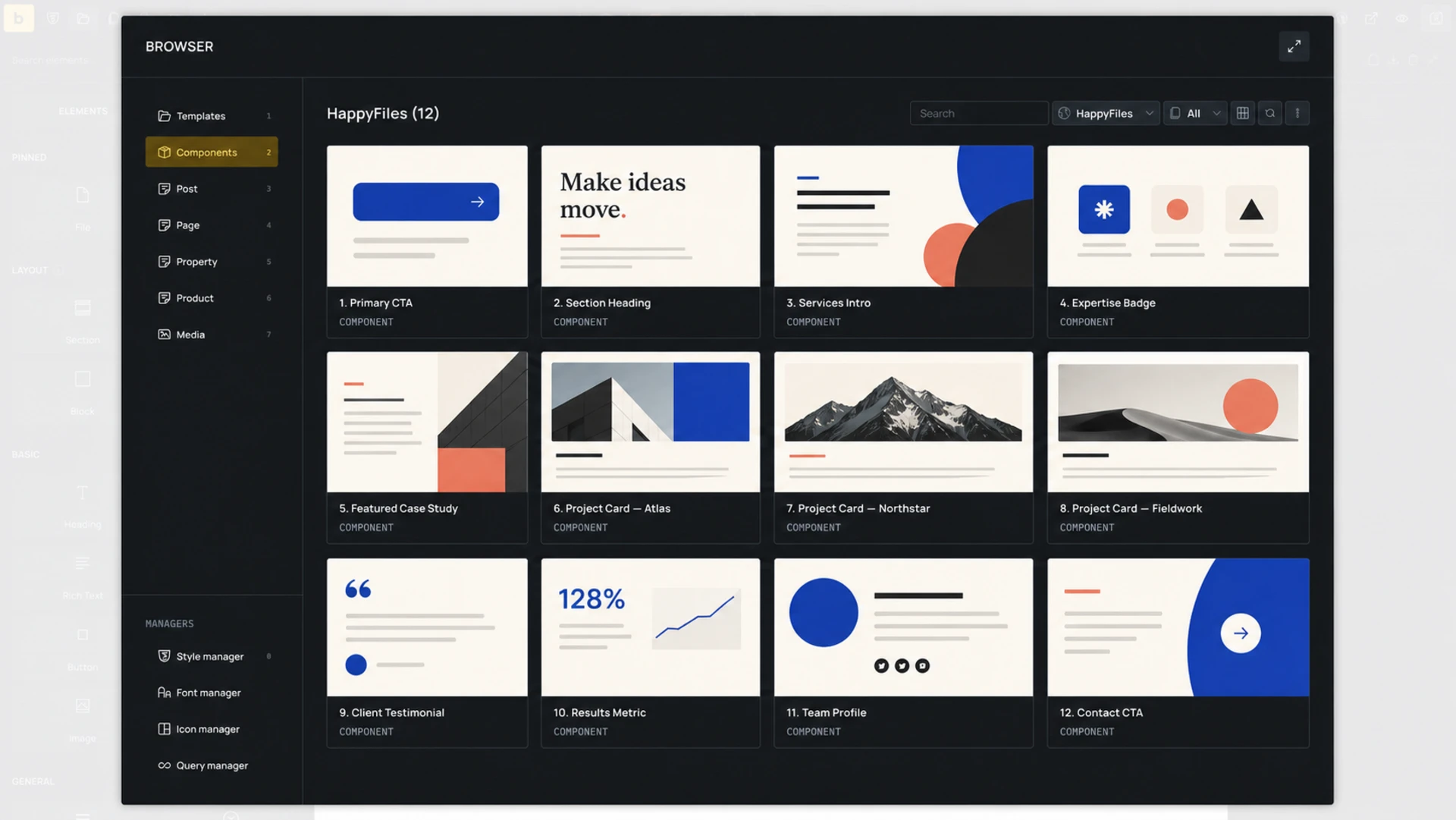
You can now browse and import components from another Bricks installation directly in the Component Manager. Imports include nested component dependencies and referenced global classes, variables, color palettes, and optional images, so the component arrives with the design-system data it needs.
Remote templates now transfer their component dependencies too. Site owners can share templates and components through the same remote access settings as templates, exclude individual components, and review compatibility or naming conflicts before importing.
Documentation: http://academy.bricksbuilder.io/builder/features/remote-components/
Media management in Bricks Browser
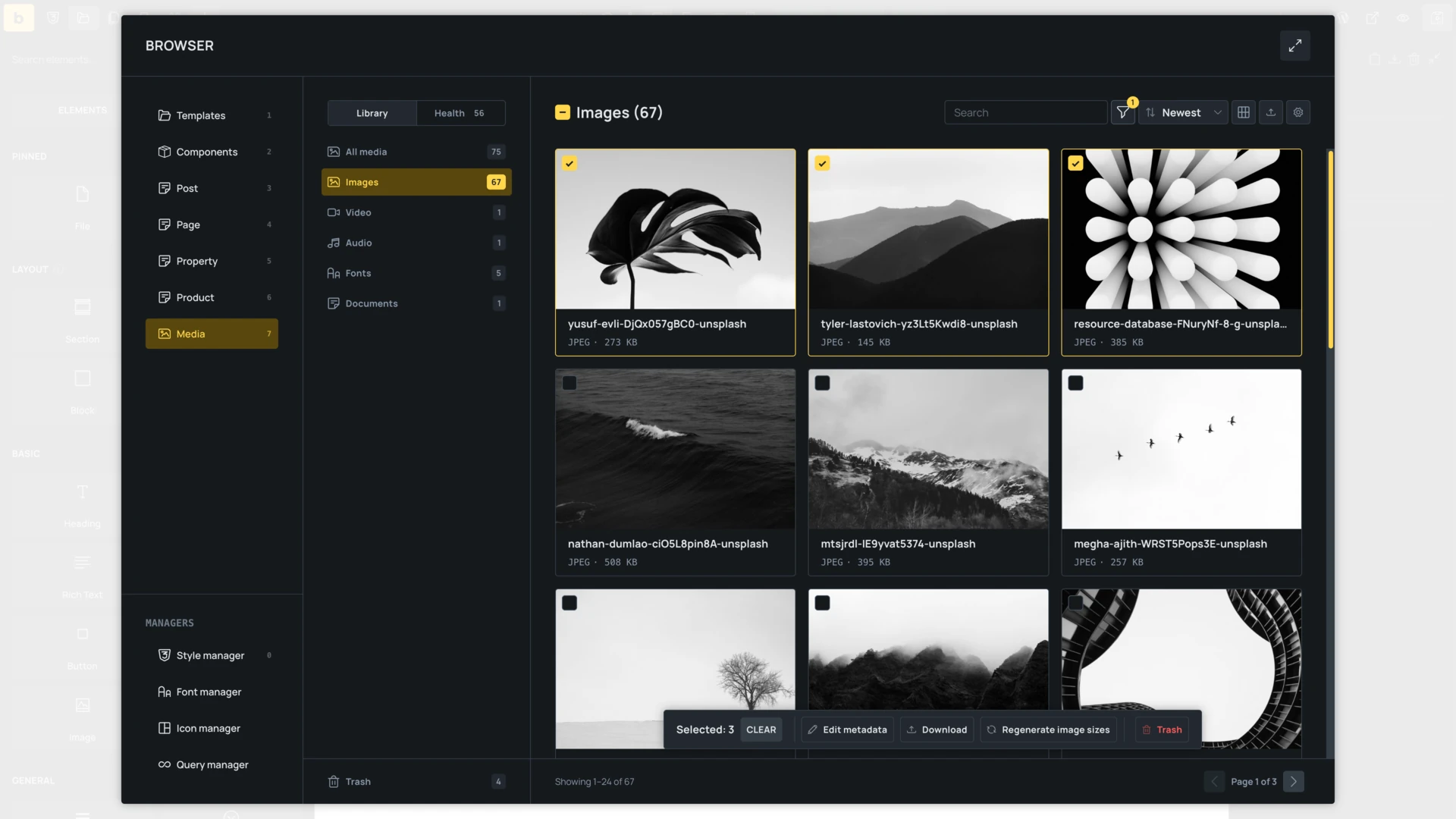
Media controls (i.e. Audio, Image, Video, SVG) now open the new Bricks Media Browser by default instead of the WordPress media modal. The Media view supports search and filtering, single and bulk selection, uploads, metadata editing, bulk actions, and usage review from the builder.
Media Health scans attachments for broken files, missing alt text, missing image sizes, oversized files, and obsolete formats. You can filter the library by these findings and resolve them from Attachment Details by adding alt text, generating image sizes, optimizing or converting images, and replacing or relinking files.
The available actions respect the current user’s media permissions. The updated selection flow also keeps attachment details and decorative-image settings available when inserting media.
Documentation: http://academy.bricksbuilder.io/builder/features/media-browser/
New File element
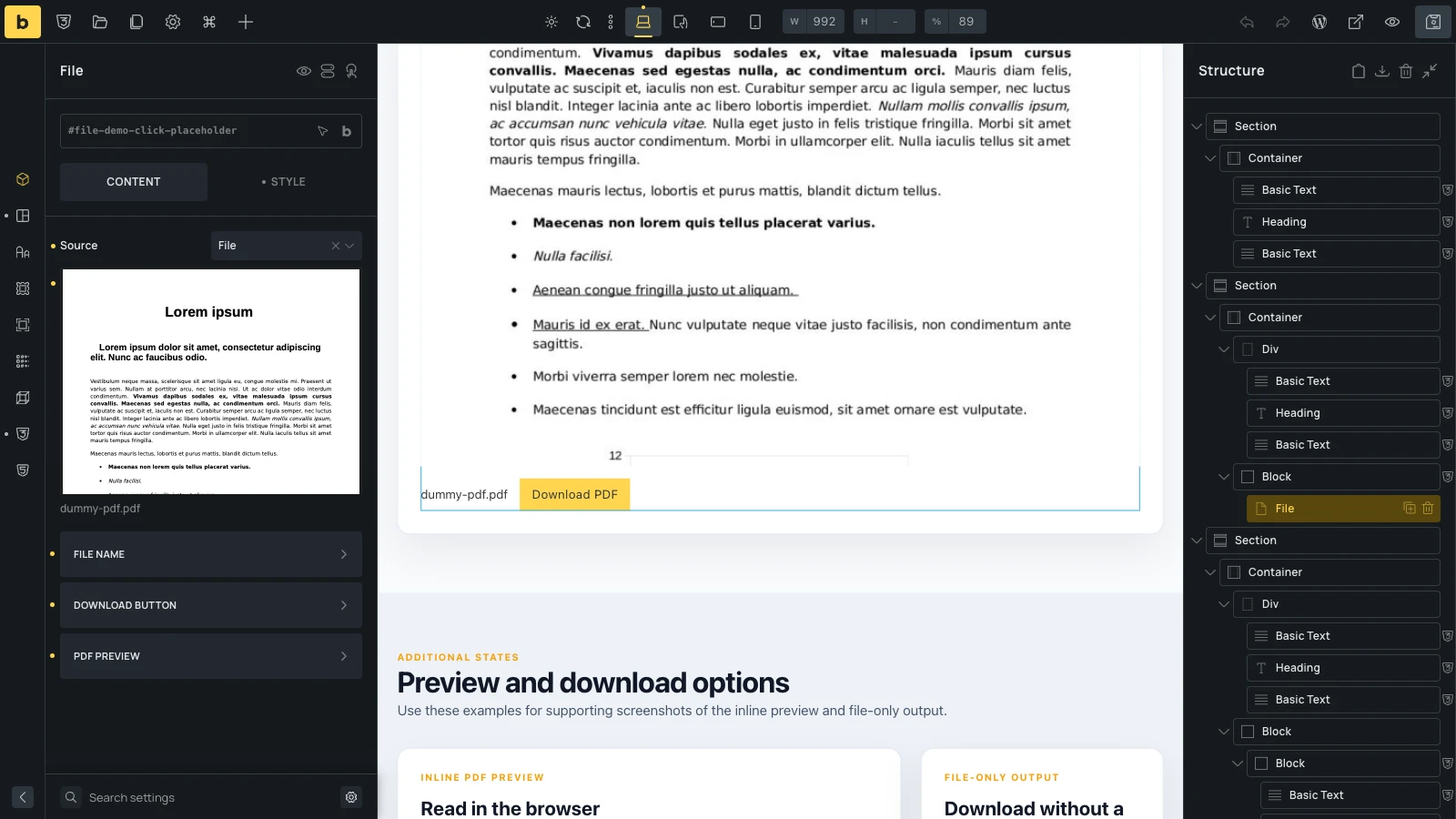
You can add documents with a native File element instead of using Code or Shortcode elements. Choose a file from the Media Library, enter an external URL, or use dynamic data from a custom field.
The element can display the file name as a link, add a download button, and show PDFs in an optional browser-native preview with responsive dimensions. When an inline PDF cannot be displayed, visitors still receive an accessible link to open or download it.
Documentation: https://academy.bricksbuilder.io/builder/elements/media/file/
Custom CSS in Class Manager
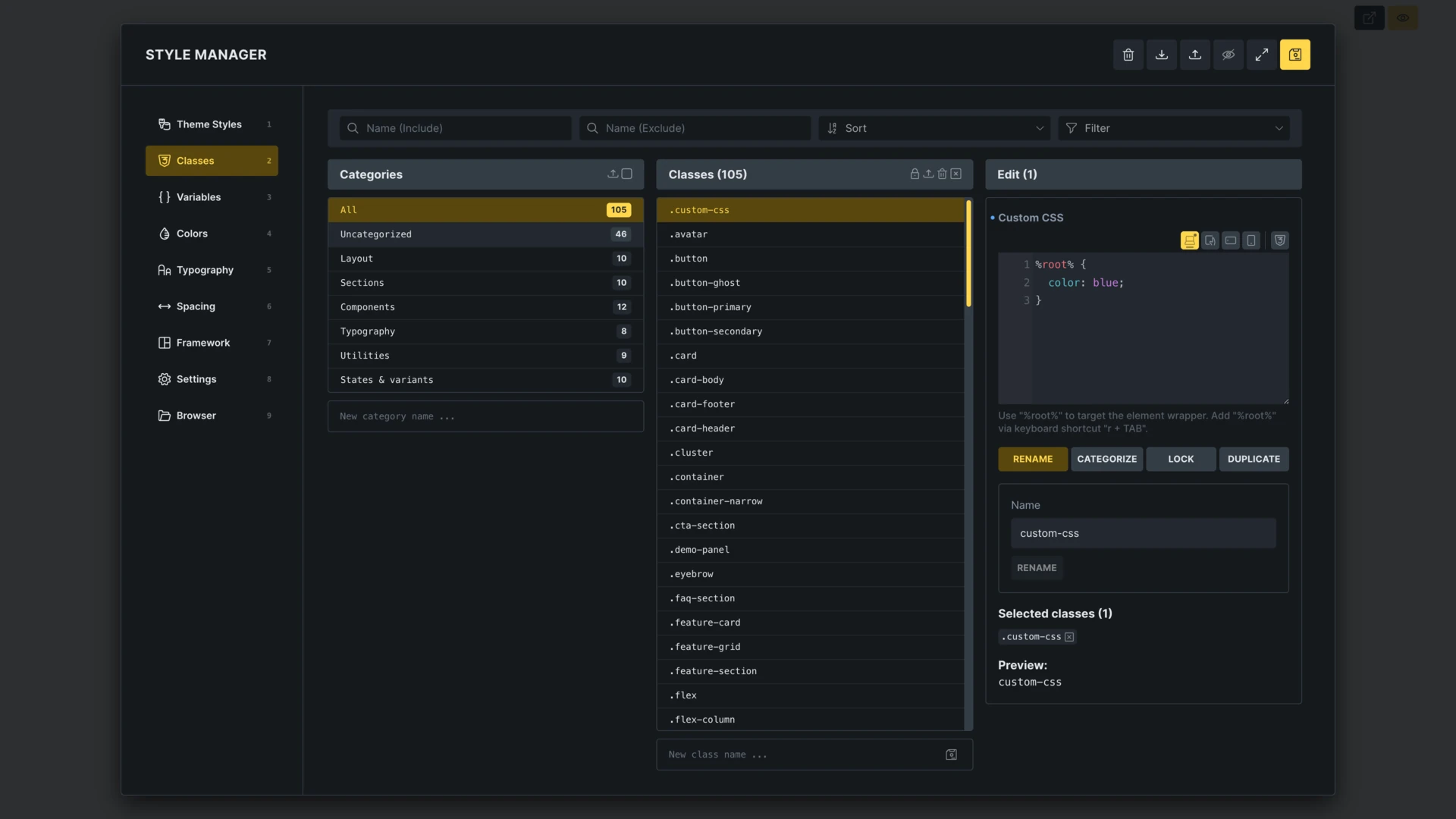
You can edit custom CSS for the selected global class directly in Class Manager. This keeps class-specific declarations with the class editing workflow, without switching back to an element’s CSS control.
Documentation: https://academy.bricksbuilder.io/builder/styling/global-class-manager/#edit-custom-css-for-a-class
Conditional form actions
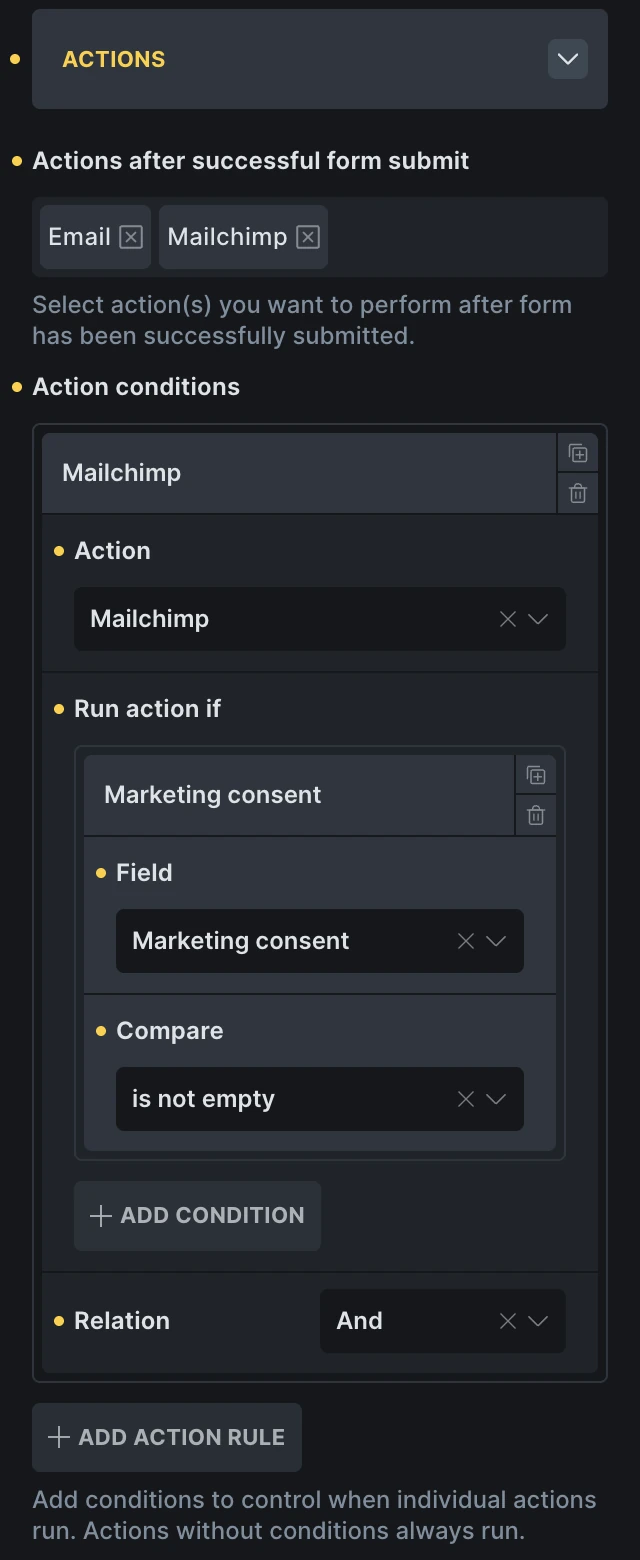
Individual form actions can now run only when their field conditions match. For example, a form can always send an enquiry email but add the submitter to Mailchimp only when a consent checkbox is selected.
Each action rule can check one or more fields with is, is not, contains, does not contain, is empty, and is not empty comparisons. Multiple conditions can use an AND or OR relation, while actions without conditions continue to run on every successful submission.
Documentation: https://academy.bricksbuilder.io/builder/elements/general/form/#conditional-actions
Precise Visibility Triggers for Viewport Interactions
Viewport interactions now include an Element visibility setting. Choose how much of an element must be visible before an “Enter viewport” or “Leave viewport” interaction runs, from any visible part at 0% to the entire element at 100%. Combine it with Root margin and custom targets for more precise animation timing.
Documentation: https://academy.bricksbuilder.io/builder/features/interactions/#viewport-triggers
WooCommerce v2 improvements
WooCommerce v2 in Beta 3 adds dedicated Cart item data, Order item data, and Checkout account fields elements, plus new cart-item dynamic tags for unit prices and savings. Cart, checkout, and order layouts can now display product titles separately from variation and other item metadata, while Checkout and Account states gain more control over login behavior and header or footer visibility. If you set up WooCommerce v2 with an earlier beta, we recommend running the WooCommerce Setup wizard again to install the latest structures with these new elements and dynamic tags.
Other improvements and notable fixes
- Flex and grid layouts now share the row and column gap controls, so switching the display mode keeps existing gap values visible and editable.
- Typography control: Allow custom font-family values.
- Typography control: Preview font-family on hover (enable via Bricks > Settings > Builder > Control panel)
- Components that are not on the current page can now be previewed while editing them in Component Manager or the elements panel.
- Component variants can now be reordered with drag and drop.
- Unlinking a component that contains Nav (Nestable) no longer duplicates its nested elements.
- Offcanvas direction is now responsive, allowing a panel to open from different sides at different breakpoints.
- Unified Global Import & Export can now include builder interface configuration.
- New Bricks settings “Auto-select first class” and “Disable auto-selecting last selected class”.
- WooCommerce V2 cart, checkout, and order layouts can render product titles separately from variation and item metadata. New cart-item dynamic data covers unit price and savings values.
- Checkout V2 and Account V2 state elements can now override header and footer visibility for individual states.
- Checkout V2 now shows the editable Login Required state when guest checkout and account creation during checkout are disabled.
Full changelog
- AI abilities: Add an opt-in PHP execution abilityNew
- Browser: Add media search, filtering, selection, and uploadsNew
- Builder: Preview font families on hoverNew
- Class Manager: Edit custom CSS for the selected classNew
- Entry Animations: Control the viewport position and trigger selectorNew
- File element: Add inline PDF previewsNew
- Form: Run actions conditionallyNew
- Remote Components: Browse and import components from remote sitesNew
- Typography control: Allow custom font family valuesNew
- WPML: Make code controls translatableNew
- AI abilities and skills: Improve performance, reliability, and HTML/CSS conversionImprove
- Block editor: Add an option to exclude theme styles from Gutenberg inline CSSImprove
- Bricks settings: Add controls for automatic class selectionImprove
- Builder: Match context menus and popup backdrops to light and dark modesImprove
- Builder: Optionally show permalinks in post selectorsImprove
- Builder: Refine the Icon Manager and Theme Styles interfacesImprove
- Color Manager: Resolve external CSS variables in previews and conversionsImprove
- Component properties: Allow reordering Select optionsImprove
- Component variants: Allow drag-and-drop sortingImprove
- Components: Preview off-page components while editingImprove
- Filter – Radio: Wrap options in a fieldset for accessibilityImprove
- Global Import & Export: Include builder interface settingsImprove
- Google Fonts: Reduce font lookup overhead on the frontendImprove
- Gutenberg: Correct the notice for empty pages using Bricks templatesImprove
- Image control: Show all registered sizes even when the selected image lacks a generated sizeImprove
- Offcanvas: Add responsive direction controlsImprove
- Template preview: Scope the Populate Content selector correctly for Single templatesImprove
- Theme Styles: Add the grid display option to all layout elementsImprove
- Unify gap controls for flex and grid layoutsImprove
- Variable Manager: Allow reordering color palette categoriesImprove
- Visual Grid Builder: Hide grid lines for non-controllable internal-grid elementsImprove
- Visual Grid Builder: Prevent items in the same grid cell from overlappingImprove
- WPML: Show the language code in popup interaction settingsImprove
- WooCommerce Mini Cart: Reduce Dynamic Fragment delay after quantity updatesImprove
- WooCommerce v2: Add cart item price and savings Dynamic DataImprove
- WooCommerce v2: Add header and footer visibility controls for statesImprove
- WooCommerce v2: Improve checkout login and mobile shipping option stylesImprove
- WooCommerce v2: Keep address selects interactive before SelectWoo initializes to prevent layout shiftsImprove
- WooCommerce v2: Remove strong tags generated by {woo_cart_order_total} Dynamic DataImprove
- WooCommerce v2: Separate product titles and item data across cart, checkout, and ordersImprove
- WooCommerce v2: Stabilize AJAX cart and Dynamic Fragment refreshesImprove
- WooCommerce v2: Update predefined structures for new Dynamic Data and elementsImprove
- WooCommerce: Preserve Free Shipping Progress Bar animation progress after cart updatesImprove
- AI abilities: Accept valid image link settings when writing elementsFix
- AI abilities: Preserve unitless zero declarations during custom CSS normalizationFix
- AI abilities: Preserve child order when writing elements from flat arraysFix
- AI abilities: Prevent Query Filter registry corruption from duplicate filter IDsFix
- AI abilities: Prevent image lightbox link settings from blocking page writesFix
- AI abilities: Prevent self-targeting custom CSS pseudo-selectors from creating dead control settingsFix
- AI screen: Include the repository URL in the Chinese AI skills promptFix
- Block element: Preserve explicit width when align-self is stretchFix
- Bricks settings: Position the Reset Settings button correctly in RTLFix
- Bricks settings: Position the search icon correctly in RTLFix
- Browser: Widen the template type dropdown for WooCommerce template namesFix
- Builder: Align Quick Access Bar buttons correctly on smaller screensFix
- Builder: Align bottom toolbar element shortcuts correctlyFix
- Builder: Avoid rerendering PHP-rendered elements on selection when CSS Sync is enabledFix
- Builder: CSS control placeholders inherit from the correct breakpoint above baseFix
- Builder: Deselecting a global class no longer shows [object Object] in typography controlsFix
- Builder: Display color palette tooltips correctlyFix
- Builder: Keep pinned controls visible in preview modeFix
- Builder: Keep the Structure context menu within the right toolbarFix
- Builder: Keep the Structure panel visible after applying a revisionFix
- Builder: Load code controls after updates when lazy chunks are cachedFix
- Builder: Map nested media query declarations to responsive controls instead of global valuesFix
- Builder: Opening an empty theme style group no longer overwrites saved stylesFix
- Builder: Prevent Enter from inserting multiple elements after preview modeFix
- Builder: Single and Archive element group headings are missingFix
- Builder: Update the page status after publishingFix
- CSS Sync reliability improvementsFix
- CSS Sync: Add tooltips to flex alignment controls and sync them to custom CSSFix
- CSS Sync: Preserve logical and directional spacing properties without mixing themFix
- Code element: Stop automatically focusing the JavaScript control when selectedFix
- Components as blocks: Show MCP-created components in GutenbergFix
- Components: Clear the unsaved changes indicator after savingFix
- Components: Prevent duplicate elements when unlinking nested Section, Container, and Nav elementsFix
- Custom CSS: Keep the autocomplete dropdown visible in narrow editorsFix
- Dynamic Data: Detect JetEngine user meta tags containing spaces on the frontendFix
- Dynamic Data: Render nested dynamic tags inside echo arguments on the frontendFix
- Filter – Search: Trigger Filter Submit interactions when pressing EnterFix
- Filter – Select: Prevent the initial Choices.js style flicker and correct placeholder typographyFix
- Form: Prevent honeypot overflow on RTL sitesFix
- Global Import & Export: Avoid duplicate variable font files during custom font importsFix
- HTML/CSS paste: Map font-family variables to variable values instead of the font dropdownFix
- Query Manager: Add vertical scrolling to the query settings panelFix
- Query loop: Preserve WP Grid Builder facets during archive AJAX requests for secondary queriesFix
- Quick Access Bar: Show style indicators in condition, interaction, and Hide Element panelsFix
- Settings: Improve interface spacingFix
- Style Manager: Show newly added colors immediately in palettes with more than 30 colorsFix
- Style Manager: Switching from Variables category to Typography causes console errorFix
- Translations: Correct Traditional Chinese stringsFix
- Variable Manager: Move variables into custom categoriesFix
- Variable picker: Remember the expanded or collapsed state of “Uncategorized”Fix
- WooCommerce Account v2: Limit pagination queries to the current endpoint and stateFix
- WooCommerce Account v2: Populate {woo_order_again_url} in the View Order stateFix
- WooCommerce Cart quantity: Correct RTL controls and support custom iconsFix
- WooCommerce Cart v2: Improve custom stepper icon styling and button sizingFix
- WooCommerce Cart v2: Prevent quantity increases at the stock limitFix
- WooCommerce Cart v2: Reinitialize cart loops after AJAX updates and preserve remove URLsFix
- WooCommerce Cart v2: Render Dynamic Data correctly in isolated builder previewsFix
- WooCommerce Cart v2: Render valid empty-state markup and preserve removal noticesFix
- WooCommerce Checkout v2: Align floating labels correctly in RTLFix
- WooCommerce Checkout v2: Apply indicator styles to the Ship to a Different Address checkboxFix
- WooCommerce Checkout v2: Complete account creation and login settings behaviorFix
- WooCommerce Checkout v2: Correct Select2 field controls, padding, and initial layout shiftFix
- WooCommerce Checkout v2: Guest-disabled checkout no longer bypasses the Login Required stateFix
- WooCommerce Checkout v2: Prevent duplicate product-removal requests and enforce cart quantity limitsFix
- WooCommerce Checkout v2: Prevent horizontal resizing of order notes when floating labels are disabledFix
- WooCommerce Checkout v2: Prevent incorrect wrapping in the Terms checkbox textFix
- WooCommerce Checkout v2: Show shipping options when shipping is forced to the billing addressFix
- WooCommerce Dynamic Fragment: Apply root links when the HTML tag is set to aFix
- WooCommerce Dynamic Fragment: Remove the empty Flex group from the Style tabFix
- WooCommerce Setup Wizard: Correct admin notice placement and RTL card actionsFix
- WooCommerce v2: Apply the default checked radio style to Payment OptionsFix
- WooCommerce v2: Support nested order items and clarify query loop contextFix
- WooCommerce: Allow 1-Click Setup when a required element is disabledFix
- WooCommerce: Animate the Free Shipping Progress Bar after cart item removalFix
- WooCommerce: Apply Order Summary, Checkout v2, and Cart v2 styles on the frontendFix
- WooCommerce: Prevent false Wordfence malware warnings for base.phpFix
- WooCommerce: Keep empty shop pages rendered with BricksFix