
We are crossing off some roadmap items in this release alongside 60+ other changes.
Resizing the structure panel by dragging it from the inner edge towards the canvas is now possible.
You can instantly spot unsaved changes thanks to the new save button indicator.

Element breadcrumb navigation
Quickly view and navigate to any parent of the active element. This opt-in builder feature can be enabled under Bricks > Settings > Builder > Element breadcrumbs.
Select between showing either the default Bricks element names or your custom-set names.
Form element additions
The form action “Registration” has a new control that allows you to set the role the newly registered user should get. The default is set under Settings > General > New User Default Role. As a security precaution, the user role administrator is not available.
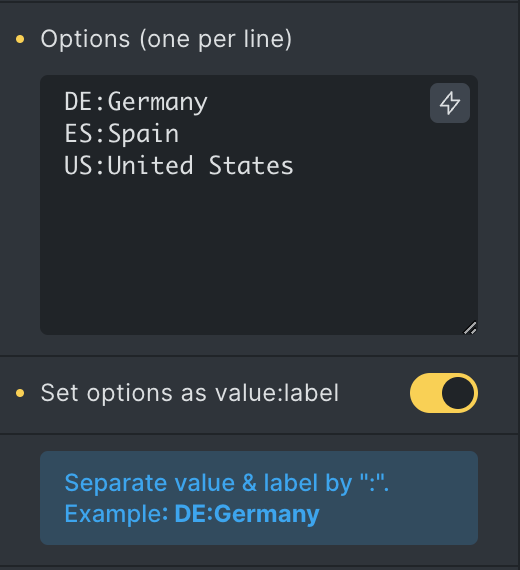
The field type checkbox, select, and radio now support setting the value and label for every option, separated by a colon by enabling the Set options as value:label control, as shown in the following screenshot.
More powerful link control
We renamed the link type “External URL” to “Custom URL” as the phrase external is somewhat misleading, considering you can link to any URL or section on the same page (e.g., #hero).
The new link type “Taxonomy (Term)” lets you link to any taxonomy term on your site:

When linking to any “Internal post/page”, you can now also add any URL parameters:

Other noteworthy changes
One notable fix concerns the custom “HTML tag” setting available for multiple elements. Bricks now extracts and validates the HTML tag to prevent potential XSS vulnerabilities.
With maintenance mode enabled, popups are no longer rendered by default. Like header and footer templates, you can enable popup render under Bricks > Settings > Maintenance mode.
Google Maps can now be used without an API key through the Embed API, which is very limited by Google. It only allows for one address, zoom level, and map type. For more options, you have to use an API key.
Create a product “Quick view” inside your WooCommerce product query using popups by following this guide at https://academy.bricksbuilder.io/article/how-to-create-product-quick-view-with-bricks/
Please take the time to review the changelog entry below, which includes all the other new features, improvements, and fixes.
Full changelog
- Builder: Resizable structure panelNew
- Form element: Provide user role setting for action “User registration”New
- Builder: Element breadcrumb navigationNew
- Builder: Save button indicator for unsaved changesNew
- Form element: Set value & label options (checkbox, select, radio)New
- Link control: New “Taxonomy (Term)” optionNew
- Link control: Set URL parameters for internal linksNew
- Google Maps: Use without API key (through Embed API)New
- Maintenance mode: Don’t render popups by default (enable in Bricks settings)New
- My Template import: Support image import (builder)New
- Offcanvas: New settings to disable auto-focus and scroll-to-topNew
- Tabs & Nestable Tabs element: New setting to open tabs on hoverNew
- Product Title element: New setting “Link to product”New
- SVG element: New “Link” settingNew
- Template screenshots: Generate screenshots on “save as a template”New
- WooCommerce: Support creating “Quick View” via AJAX popup (incl. gallery, reviews)New
- Builder: Input fields cause moving #bricks-panel-innerImprove
- Builder: Attribute name validation (not on frontend to prevent unintended attribute removal)Improve
- Builder: Improve toolbar on mobile (smaller icons, horizontal scroll)Improve
- Builder: Settings indicator reset not 100% clickableImprove
- Builder: Support parsing DD tags in element attribute name and valueImprove
- Custom Login Page: Auto-close WP session expired modal after successful log inImprove
- Prevent potential XSS vulnerability through custom HTML tag settingImprove
- Dynamic Data: echo function to accept “?” as a parameterImprove
- Template import: Ensure each template’s post_date has a 1 second differences (avoid duplicated results in wp-admin)Improve
- Link control: Renamed “External URL” to “Custom URL”Improve
- No “Edit With Bricks” button if custom post type doesn’t support “editor” functionalityImprove
- Products Pagination: Add flex-wrapImprove
- Template screenshots: z-index, font, and performance issuesImprove
- Toolbar: States indicator not showing if set on classImprove
- Variables manager: used/unused filter support global classesImprove
- Video element: Add “none” as preload optionImprove
- Builder: Transition control placeholder shows “width” instead of “all”Fix
- Button: Linking to Lightbox image/video, “Style – light” from theme styles gets appliedFix
- Builder: Outline button isn’t transparent on the canvasFix
- Carousel & Sliders: Not working inside CSS gridFix
- Code element: Breaks when DD tags are added without quotesFix
- Comments: Overflow on mobile due to long linksFix
- Custom CSS: Class %root% refers to old name after class renamed in class managerFix
- Disable header/footer setting read from incorrect template in term archive if term ID same as one of the template IDFix
- Dynamic Data: New argument parserFix
- Element conditions: iPhone & iPad not workingFix
- Form element: File upload error message not displayedFix
- Form element: Improper label association with flatpickr date fieldFix
- Form element: Field width incorrect if redirect_to param exists on the pageFix
- Icon List: SVG CSS not applied on frontend; Add new icon list element uses previous element settingsFix
- Image element: Caption overflow (when border-radius set)Fix
- Main Query with offset value: Pagination always returning same resultFix
- Maintenance mode: WPML supportFix
- My Templates admin screen: Add post_type to bundle and tag linksFix
- Nav Nestable: Briefly flashes when changing from desktop to mobileFix
- Nestable element: Children empty when using bricks_template shortcode to render in builderFix
- One page navigation: Gap applies to wrong selectorFix
- Posts element: Is main query setting not workingFix
- Product gallery with thumbnail slider: 1st thumbnail not changing (if selected variation image not in product gallery)Fix
- Products element: Is main query not workingFix
- Tabs Nestable: Duplicating tab title/content requires canvas reloadFix
- Template screenshots: Not working in SafariFix
- Template: Issues with Author element & post_title DD tag & Post title elementFix
- WPML: ATE strings not in orderFix
- WooCommerce – Empty cart: Featured image tag causes error in the “Cart contents” query loopFix
- WooCommerce: Product gallery not re-init if fetched via AJAXFix
- WooCommerce Notice: Missing styles for error notice buttonFix
- Dynamic Data: “echo” in link attributes returns empty valueFix
- Query Filter: Index job stuck (if filter element removed, but task still in the job table)Fix